
Many GCC businesses start on Tally or QuickBooks for bookkeeping, and some look at SAP Business One when they outgrow it. Odoo 19 often makes the same shortlist. Each product has real strengths, and the right choice depends on how far beyond accounting you need to go, how many users and branches you run, and how much you want to spend over five years. This guide gives you a practical, step-by-step way to compare the options and reach a decision you can defend to your board.
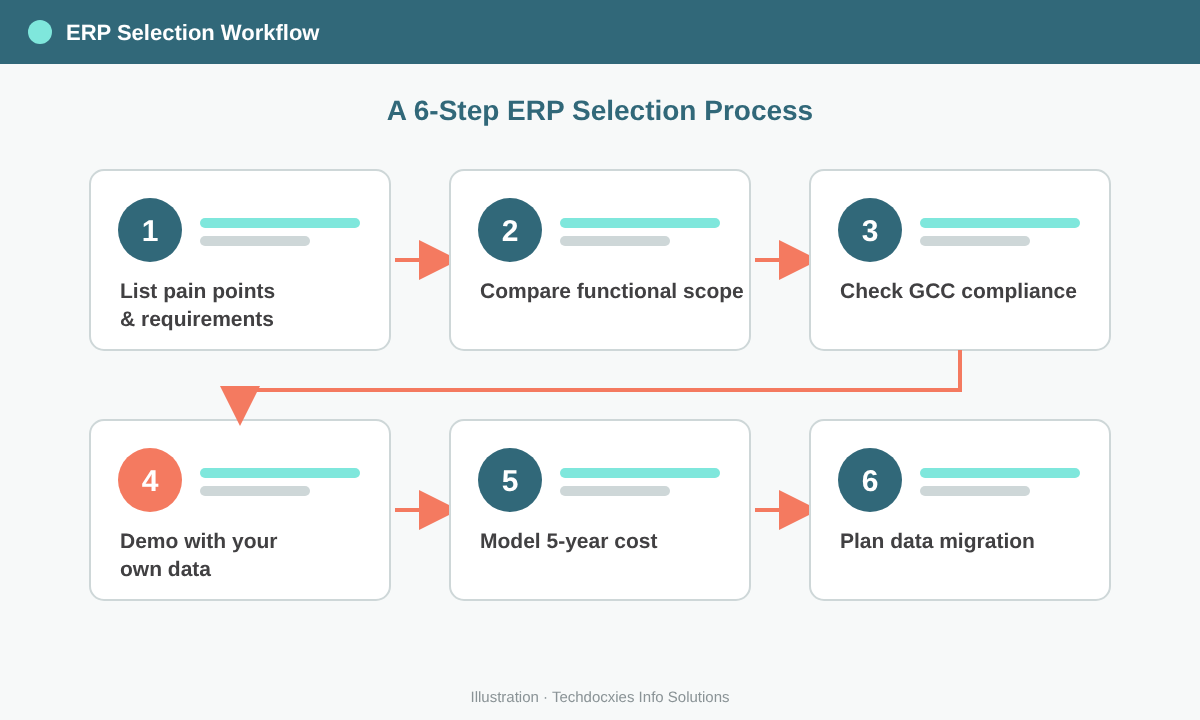
A six-step selection process that keeps the decision tied to your own requirements, not vendor slides.
Step 1: List Your Pain Points and Requirements
Start with what is hurting today, not with software features. Typical complaints from GCC trading and service companies are: stock figures that never match the warehouse, sales staff who can't see customer balances, payroll run in spreadsheets, and month-end closes that take two weeks. Ask each department head for their top five problems and the reports they wish they had.
Turn these into a requirements list with a priority on each line: must have, should have or nice to have. Add volumes too: number of users, branches, warehouses, companies, currencies and invoices per month. Volumes matter, because a tool that is fine for one company and five users can strain at three companies and forty users.
Step 2: Compare Functional Scope
This is where the four products differ most. Tally and QuickBooks are mainly accounting tools with inventory features: strong at ledgers, invoicing and VAT, but you usually add separate products for CRM, HR, eCommerce or manufacturing. SAP Business One is a full ERP for small and mid-sized companies, generally sold and hosted through SAP partners. Odoo 19 is a modular suite in which accounting, inventory, sales, CRM, purchase, HR, payroll, manufacturing, projects, POS and website all share one database.
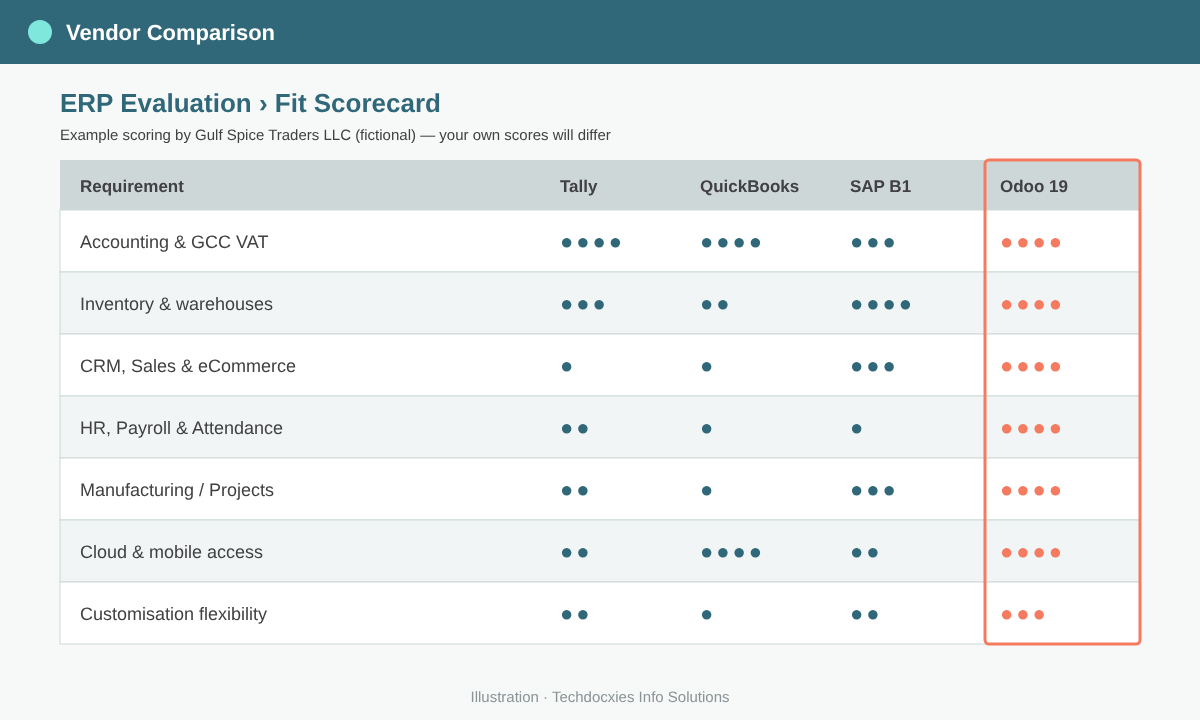
A weighted fit scorecard. Score each product against your own requirements list. The scores shown are examples only.
| Question to ask | Why it matters |
|---|---|
| Which processes run inside the product, and which need add-ons? | Every add-on means another licence, another integration and another place where data can go wrong |
| Is it cloud, desktop or both? | This decides remote access, mobile use, backups and who looks after servers |
| How are users licensed? | Per-user, per-module and per-edition pricing grow at very different rates |
| Who can customise it, and how? | It affects how easily you can change things later and how much you depend on one partner |
| How is it upgraded? | Version upgrades can turn into a project in their own right if customisations are heavy |
Step 3: Check GCC Compliance and Localisation
All four products are used in the Gulf, but check the details for your country rather than relying on a brochure. Confirm VAT invoice layouts in Arabic and English, tax reports that match your return, multi-currency revaluation, and readiness for e-invoicing (ZATCA Phase 2 in Saudi Arabia, and the e-invoicing programmes now being rolled out in the UAE and Oman).
In Odoo, install your country's fiscal localisation package. It loads the chart of accounts, taxes and tax report. You'll find it in Accounting › Configuration › Settings under Fiscal Localization. Then go through the taxes in Accounting › Configuration › Taxes and the VAT report in Accounting › Reporting › Tax Return. Odoo's Saudi localisation includes ZATCA e-invoicing integration. For other countries, ask your partner about the current status.
Pro tip: Give every vendor the same three scripted scenarios to demo, for example "import container to landed cost to stock valuation", "quotation to delivery to invoice to payment" and "month-end VAT return". Demos built around your scripts are much easier to compare than each vendor's standard tour.
Step 4: Run a Demo With Your Own Data
Generic demo data hides gaps. Start an Odoo trial, set up your company in Settings › Companies, and install only the apps you'd actually use from the Apps menu. Load a sample of real customers, products and one month of transactions. Then ask your key users to process their everyday work end-to-end. Do the same with any other shortlisted product that offers a trial or a sandbox.
Ask finance to check that reports such as the trial balance, aged receivables and stock valuation agree with the old system for the sample period. If a key user can't finish a common task without help after a short walkthrough, note it down. That says a lot about future training effort.
Step 5: Model Five-Year Total Cost of Ownership
Licence prices are only part of the cost. Build a simple five-year model with these lines: subscription or licence fees, annual maintenance, hosting or servers, implementation, data migration, customisation, training, integrations and support. Include the add-on products an accounting-only tool would need to match your requirements, such as a separate CRM, HR system or eCommerce platform.
Run the model for today's user count and for your three-year growth plan. Many companies find the cheapest option in year one is not the cheapest in year five once users, branches and add-ons are counted. Always get current, written quotes. Pricing and editions change often for all four products.
Watch out: Don't choose on features alone. A product that covers 100% of your list but needs heavy custom code can cost more and upgrade worse than one that covers 90% out of the box with small process changes. Score how a requirement is met (standard, configuration or custom code), not just whether it is met.
Step 6: Plan the Data Migration
Whichever system you choose, plan migration early. Moving from Tally, QuickBooks or SAP Business One to Odoo usually means exporting masters and balances to spreadsheets, cleaning them, and importing them. In Odoo, most list views offer an Import records option under the gear icon. For example, open Contacts or Inventory › Products › Products, upload your file, map each column to an Odoo field, click Test, then Import.
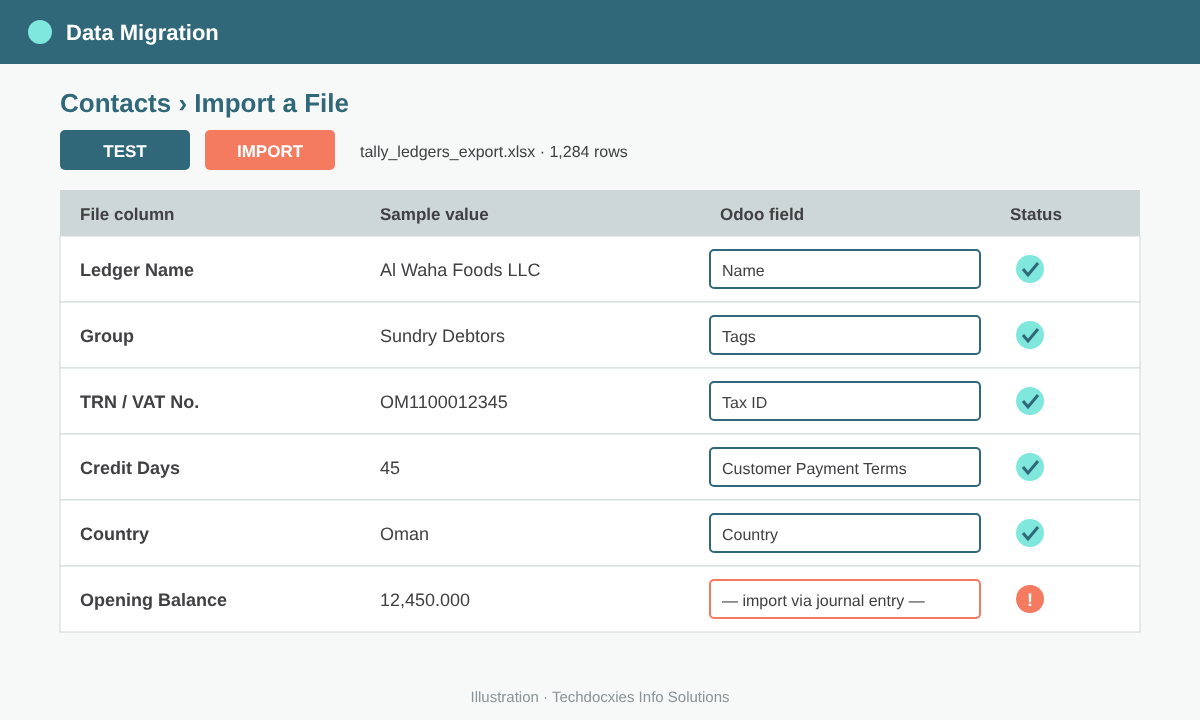
Mapping columns from a ledger export to Odoo contact fields. Opening balances are loaded separately as a journal entry.
Migrate in this order: chart of accounts, customers and vendors, products, opening stock, then open receivables, payables and the opening trial balance. Most companies bring over balances and open items rather than years of transaction history, and keep the old system read-only for reference.
ERP Selection Checklist
- ☐ Requirements list with priorities and volumes signed off by department heads
- ☐ Weighted fit scorecard completed for every shortlisted product
- ☐ VAT, Arabic invoicing and e-invoicing confirmed for each country you operate in
- ☐ Scripted demos run with your own data and key users
- ☐ Five-year TCO model built from written quotes
- ☐ Migration scope and approach agreed before contract signature
For example, Gulf Spice Traders LLC, a fictional importer with branches in Muscat and Dubai, ran this process over six weeks. Its accounting package handled VAT well but couldn't manage multi-warehouse stock, CRM or payroll without three extra products. The team chose Odoo 19 for one integrated database and kept two years of historical reports from the old system as read-only archives.
OUR EXPERTISE
How Techdocxies Helps with Choosing Between Odoo, Tally, QuickBooks and SAP B1
Techdocxies Info Solutions has delivered 50+ Odoo projects for trading, distribution and service businesses across the GCC and beyond. We don't just switch modules on — we map your real processes first, then configure, customise, migrate, train and back you with 24/7 support.
- Requirements workshops and a weighted fit scorecard built around your business
- Scripted Odoo 19 demos using your own customers, products and transactions
- GCC VAT, Arabic invoicing and e-invoicing readiness review by country
- Transparent five-year cost comparison covering licences, implementation and support
- Clean data migration from Tally, QuickBooks or SAP Business One with reconciled opening balances