
Most GCC companies know who their best forklift driver is, which accountant can handle VAT returns and which sales rep speaks fluent Arabic and Hindi — but that knowledge usually lives in a manager's head or a spreadsheet nobody updates. When an auditor asks for valid safety certificates, or a new branch needs three trained warehouse supervisors, the scramble begins. Odoo 19 lets you record skills on every employee profile, train staff through the eLearning app, test them with certifications and keep the results on their resume — all in the same database as your HR and payroll data. This guide walks through the setup step by step.
Step 1: Install the right apps
You need two apps: Employees (skills and resumes are part of it) and eLearning. Install eLearning from Apps. If you want graded exams, open eLearning › Configuration › Settings and enable Certifications — this uses the Surveys engine to build tests with pass marks. When Employees and eLearning are both installed, Odoo links them, so courses and certifications an employee completes can appear on their resume automatically.
Before you configure anything, agree with department heads on which skills actually matter. A warehouse might care about equipment licences and scanner use; finance about VAT, bank reconciliation and IFRS knowledge; sales about languages and product lines. Keep the first version short — ten well-defined skill types beat fifty vague ones.
Step 2: Define skill types and levels
Go to Employees › Configuration › Skill Types and create one record per skill family. Each skill type holds a list of individual skills and a ladder of levels with a progress percentage. Our example company, Al Noor Distribution LLC, created a "Forklift & Warehouse Equipment" type with four skills and four levels: Beginner (25%), Trained (50%), Certified (75%) and Trainer (100%).
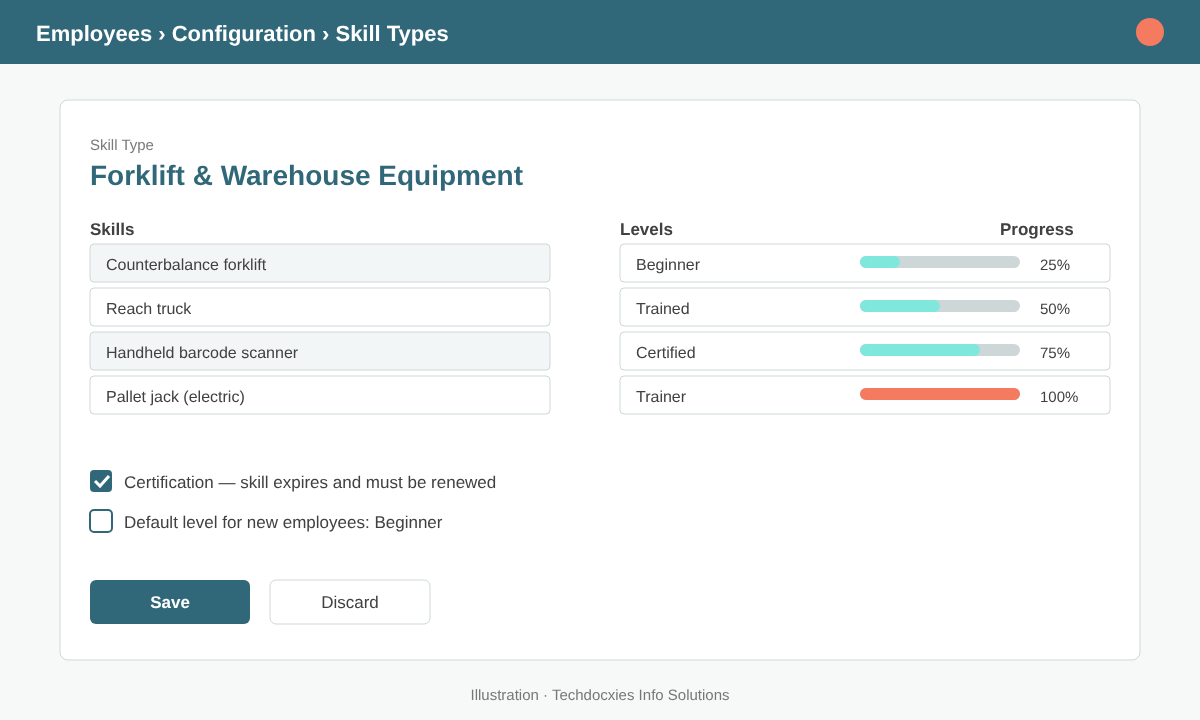
A skill type groups related skills and defines a consistent level ladder for everyone.
Use the same level names across similar skill types so managers read them the same way. For licences and safety training that expire, mark the skill type as a certification where your version offers it, so each employee skill carries validity dates and expiring items can be reviewed in reports.
| Skill type | Example skills | Expires? |
|---|---|---|
| Forklift & Equipment | Reach truck, counterbalance, electric pallet jack | Yes — renew yearly |
| Health & Safety | First aid, fire warden, working at height | Yes — 1 to 3 years |
| Odoo Skills | Inventory transfers, POS cash control, vendor bills | No |
| Finance & Tax | VAT returns, bank reconciliation, IFRS 16 | No |
| Languages | Arabic, English, Hindi/Urdu, Tagalog | No |
Step 3: Record skills on employee profiles
Open Employees, select an employee and go to the Resume tab. In the skills section, pick a skill type, a skill and the current level. The resume side holds work history, education and internal training, so the profile becomes a living CV. For a large team, have each line manager assess their own staff in one sitting rather than asking HR to guess.
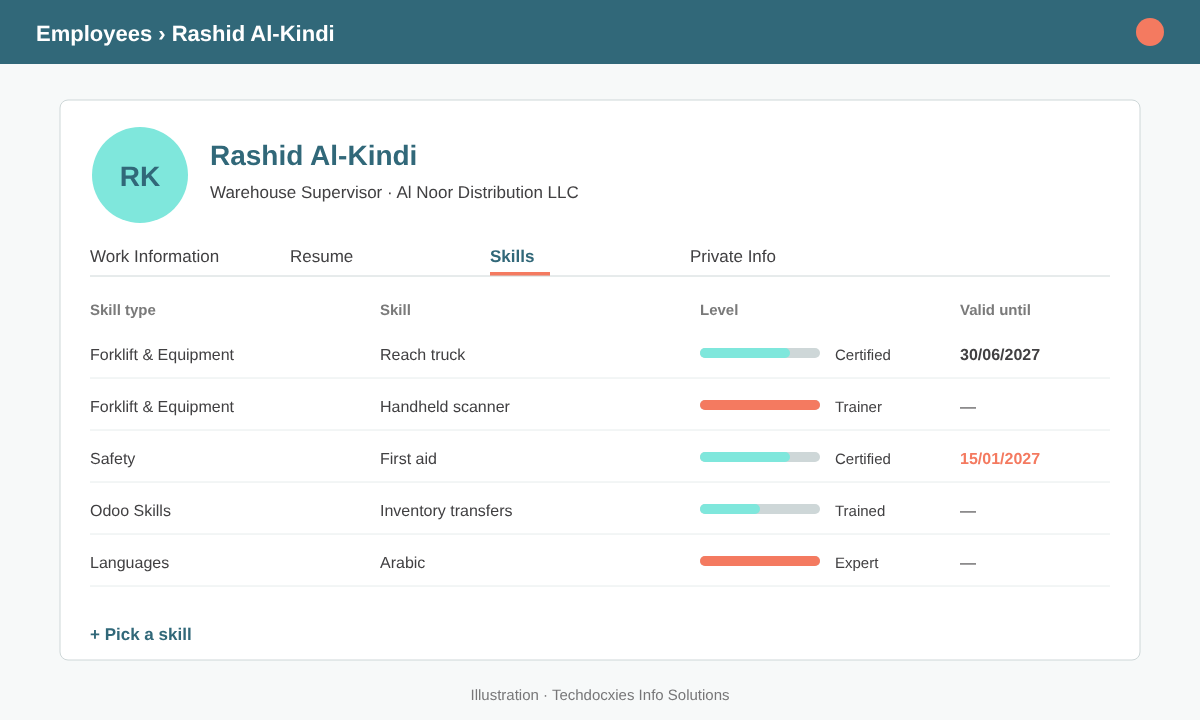
Each employee profile shows current skill levels and, for certifications, when they expire.
Once profiles are filled in, use the skills reporting under Employees › Reporting to group by skill or level. You can quickly answer questions such as "who is certified on reach trucks in the Sohar warehouse?" or "how many cashiers are trained on POS closing?".
Pro tip: Create a skill type called "Odoo Skills" and use it to track which users are trained on which parts of the system. It makes go-lives and new-hire onboarding far easier: before giving someone access to vendor bills or stock adjustments, check that the matching skill is at least "Trained".
Step 4: Build training courses in eLearning
Go to eLearning › Courses and create a course for each skill gap you found. Add content in the order people should follow it: short videos (YouTube or uploaded), PDF procedures, slides, articles and quizzes. Quizzes after each section award points and help people check their understanding before the final test.
In the course options, restrict access so internal training isn't visible on your public website: set enrolment to invitation only and limit visibility to signed-in members. Assign a responsible person (usually the department trainer) who receives questions and tracks progress. Keep each lesson under ten minutes — warehouse and retail staff often learn on a phone between shifts.
Step 5: Enrol employees and certify them
From the course, invite the employees who need the training; since employees with user accounts are already contacts in Odoo, enrolment takes seconds. Track completion from the course dashboard and send reminders to anyone who stalls.
For skills that need proof, add a certification as the final step of the course. Set a pass percentage, limit the number of attempts and, if needed, a time limit. Employees who pass receive a certificate they can download, and the result is added to their resume. HR or the line manager then raises the matching skill level — for example from "Trained" to "Certified" with a new validity date.
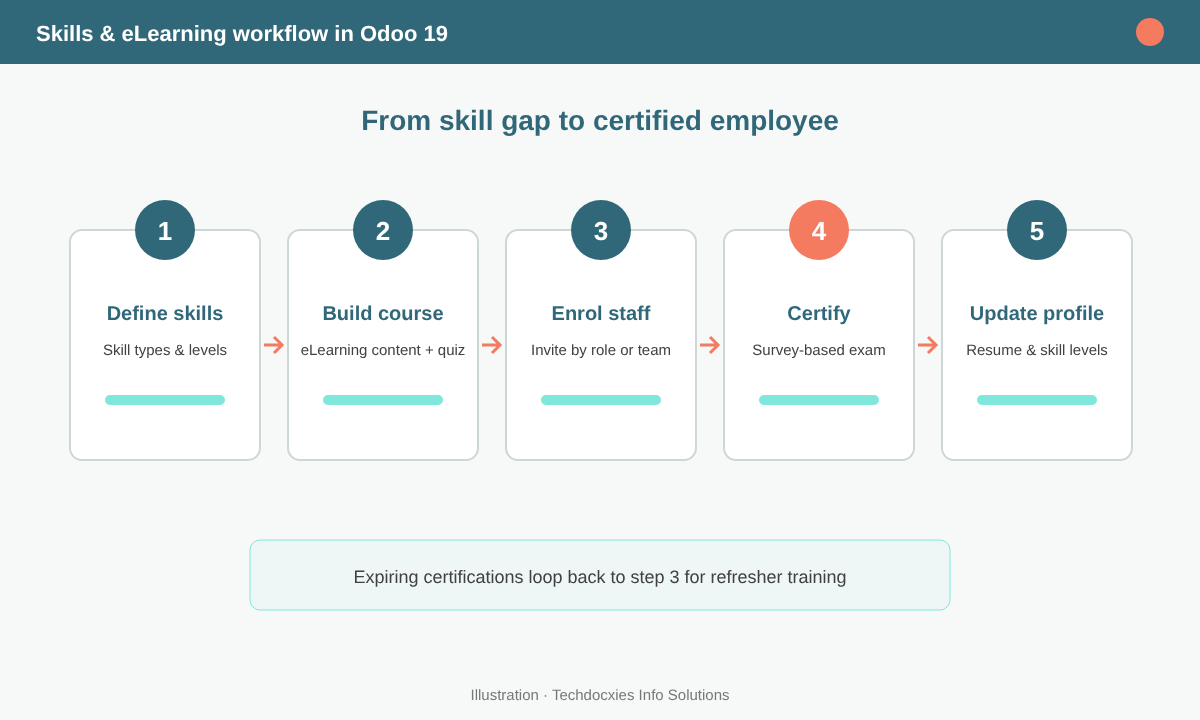
The complete loop: define skills, train, certify and update the profile, then repeat when certificates expire.
Watch out: Completing an online course is not the same as being licensed. In the GCC, equipment operation, civil defence and some health and safety roles require certificates from approved external bodies. Use Odoo to track and remind, but upload the official certificate to the employee's documents and record its real expiry date — don't let an internal quiz replace a legal requirement.
Step 6: Review gaps and renewals every month
Make skills part of your HR routine. A simple monthly checklist keeps the data trustworthy:
- Filter certification skills expiring in the next 60 days and re-enrol those employees.
- Check course completion rates by department and follow up with managers.
- Add skill requirements to job positions so recruiters know what to test for.
- Link skill levels to your appraisal goals so growth is visible at review time.
- Retire old courses and update content when your procedures or Odoo screens change.
Done consistently, this turns training from a yearly cost line into a measurable asset: you know who can do what, who needs help, and which certifications protect you in an audit.
OUR EXPERTISE
How Techdocxies Helps with Skills & eLearning
Techdocxies Info Solutions has delivered 50+ Odoo projects for trading, distribution and service businesses across the GCC and beyond. We don't just switch modules on — we map your real processes first, then configure, customise, migrate, train and back you with 24/7 support.
- Skills matrix design per department, with consistent levels and certification rules
- Migration of existing training records and certificates from spreadsheets into Odoo
- Internal eLearning academies with courses, quizzes and certifications in English and Arabic
- Expiry alerts and dashboards for licences, safety and compliance training
- Linking skills to recruitment, appraisals and Odoo user onboarding