
Most trading companies in the GCC still calculate sales commissions in a spreadsheet at month-end: someone exports invoices, filters by salesperson, applies a rate per product line and hopes nobody disputes the total. Odoo 19 can do this inside the Sales app, with commission plans that read confirmed orders or posted invoices directly. This guide walks through a practical setup for a distributor, using the invented example of Gulfstar Electricals Trading LLC, a Dubai-based electrical wholesaler with a field sales team and two product-category specialists.
Step 1: Decide your commission policy before you open Odoo
Commission rules fail most often because the policy itself is vague. Before configuring anything, write down answers to these questions with your sales director and finance manager:
- What triggers commission? A confirmed sales order, a posted invoice, or (stricter) a paid invoice.
- What is it based on? Revenue, quantity of specific products, or gross margin.
- Is it a flat rate or target-based? A fixed percentage on every sale, or a payout that grows as the salesperson approaches a monthly or quarterly target.
- Who is covered? Individual salespeople, whole sales teams, or both.
- How is it paid? Through payroll for employees, or through a vendor bill for external agents.
Gulfstar decided on invoice-based commissions: 3% on cables, 4.5% on switchgear (a slower-moving, higher-value line), 10% of gross margin on everything to discourage heavy discounting, and a fixed AED 2 per LED panel to push a new product range.
Step 2: Enable commissions in Sales settings
Go to Sales › Configuration › Settings and activate the Commissions option, then save. If you plan to pay commission on margin, also enable margins so cost and margin are calculated on each order line. Once activated, commission plans become available from Sales › Configuration › Commission Plans.
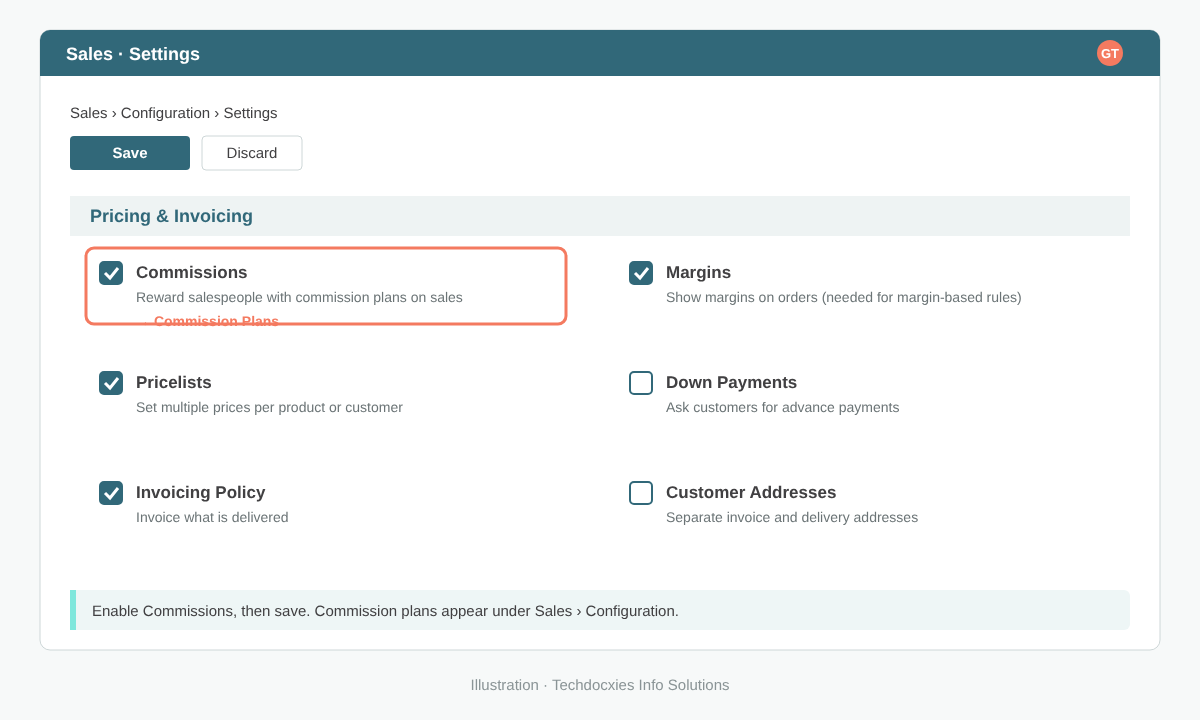
Enabling Commissions (and Margins, for margin-based rules) in Sales settings.
Make sure the product costs in Inventory are reliable before using margin rules. If your landed costs or standard costs are out of date, margin-based commission will be wrong, and salespeople will notice before you do.
Step 3: Create a commission plan
From Sales › Configuration › Commission Plans, create a new plan and fill in the header:
- Name and period: for example "Sales Team Q4 2026", running 1 October to 31 December.
- Payment frequency: monthly or quarterly, matching how you actually pay.
- Type: Achievements for straightforward rate-based commission, or Targets when payout depends on how much of a target has been reached.
- Applies to: individual salespeople or a sales team.
Keep one plan per policy and period. Running separate plans for field sales and key-account managers is far easier to audit than one plan full of exceptions.
Step 4: Define the achievement rules
On the achievements lines, add one line per rule. Each line combines what is measured (sold or invoiced amount, sold or invoiced quantity, or margin where the margin extension is installed), an optional product category or specific product, and the rate. Gulfstar's plan looks like this:
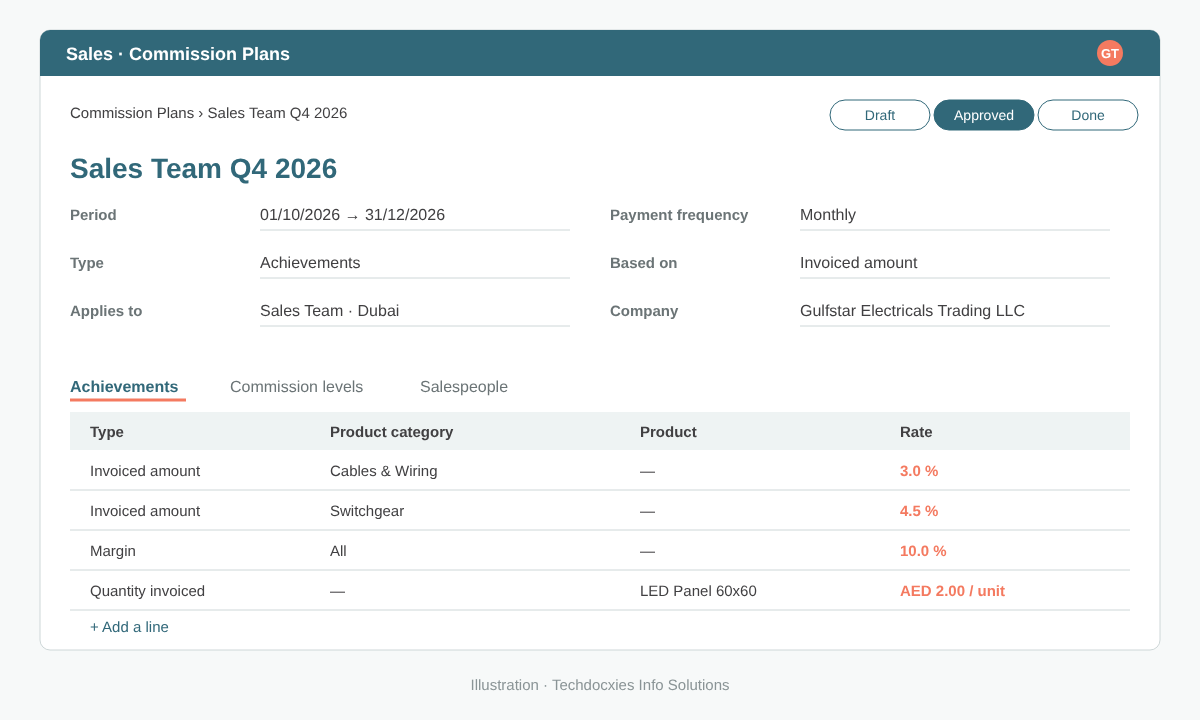
A commission plan with category rates, a margin rule and a per-unit incentive.
| Rule | Measured on | Scope | Rate |
|---|---|---|---|
| Cable sales | Invoiced amount | Category: Cables & Wiring | 3.0% |
| Switchgear sales | Invoiced amount | Category: Switchgear | 4.5% |
| Margin protection | Margin | All products | 10.0% |
| New range push | Quantity invoiced | Product: LED Panel 60x60 | AED 2.00 per unit |
Basing commission on invoices rather than orders avoids paying on orders that are later cancelled or never delivered, which matters for trading businesses with back-orders.
Step 5: Add targets and commission levels (optional)
If you choose the Targets type, you set a target amount per period for each salesperson and a table of commission levels: for example, nothing below 60% of target, AED 3,000 at 80%, AED 5,000 at 100% and AED 7,500 at 120%. Odoo works out where each salesperson sits for the period and calculates the payout accordingly. Targets suit teams whose territories are uneven in size, because they reward performance against a fair quota rather than raw volume.
Pro tip: Run a new plan for one month alongside your existing spreadsheet before switching over. Compare both figures per salesperson; any gap usually points to an uncategorised product, a missing cost price or an invoice posted to the wrong salesperson, and it is far easier to fix those before commission is paid.
Step 6: Approve, review and pay
Once the plan is reviewed, approve it so it starts counting achievements. During the period, managers and salespeople can follow progress in the commission reporting under Sales › Reporting, filtered by plan, person or period. Salespeople see exactly which invoices contributed, which removes most month-end disputes.
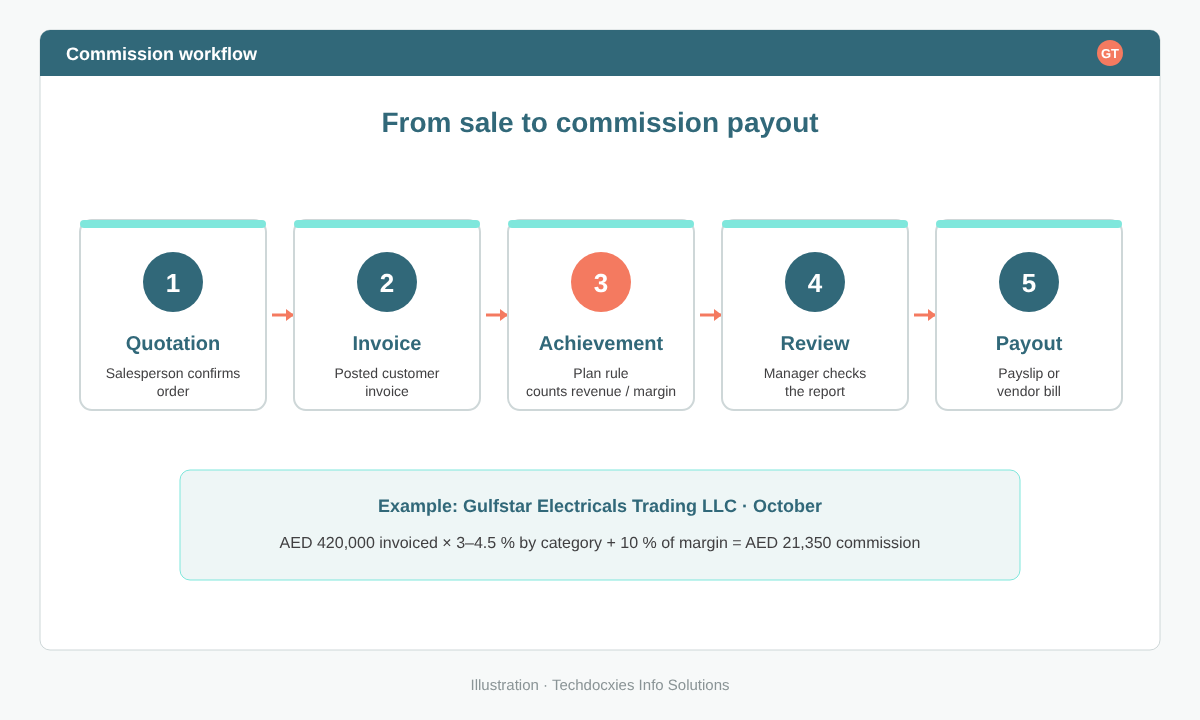
How a sale flows through to a commission payout.
For payment, employees are typically paid through payroll: Odoo offers a payroll integration that brings commission into payslips, so it lands in the same WPS salary file as basic and allowances. External agents and resellers are better paid through a vendor bill in Accounting, which keeps their payouts out of payroll and in your payables ageing.
Watch out: Credit notes reduce invoiced amounts, so a large return in the following month can push a salesperson's achievement down after commission was already paid. Agree in writing whether clawbacks are deducted from the next period, and check that every order carries the correct salesperson, because commission follows the salesperson on the order and invoice, not whoever closed the deal in real life.
Step 7: Go-live checklist
- Commission policy signed off by sales and finance.
- All products assigned to the right product categories.
- Product costs verified if margin rules are used.
- Salespeople and sales teams correctly set on customers and open orders.
- One plan per policy and period, approved before the period starts.
- Parallel run completed and figures reconciled with the old method.
- Payout route agreed: payroll for staff, vendor bills for agents.
With this in place, Gulfstar's sales director now reviews commission in under an hour each month instead of two days, and salespeople can check their own numbers whenever they want.
OUR EXPERTISE
How Techdocxies Helps with Odoo Sales Commissions
Techdocxies Info Solutions has delivered 50+ Odoo projects for trading, distribution and service businesses across the GCC and beyond. We don't just switch modules on — we map your real processes first, then configure, customise, migrate, train and back you with 24/7 support.
- Translate your commission policy into clear, auditable Odoo commission plans.
- Clean up product categories and cost prices so revenue and margin rules calculate correctly.
- Set up target-based plans with commission levels for teams, territories and key accounts.
- Connect commission to payroll payslips for staff and vendor bills for external agents.
- Run a parallel month against your spreadsheet and train managers on reviewing payouts.