
Many GCC trading companies earn a steady second income by renting out the equipment they already sell: generators, scaffolding, forklifts, event furniture, AV kits. Too often that business runs on a whiteboard and a spreadsheet, so units get double-booked, late returns go unbilled and nobody knows which serial number is on which site. Odoo 19's Rental app puts rentals on the same products, stock and invoices as your trading business. This guide shows you how to set it up step by step.
Step 1: Install Rental and set your defaults
Install the Rental app from Apps, then open Rental › Configuration › Settings. Three settings matter most for a trading company:
- Rental Transfers makes pickups and returns create real stock moves, so rented units leave your available stock and come back into it. If you track serial numbers, switch this on.
- Default Delay Costs sets the grace period and the hourly and daily fee charged when a customer returns items late. You can override the fees on each product.
- Default Padding Time keeps a buffer between two rentals of the same item for cleaning, servicing or inspection.
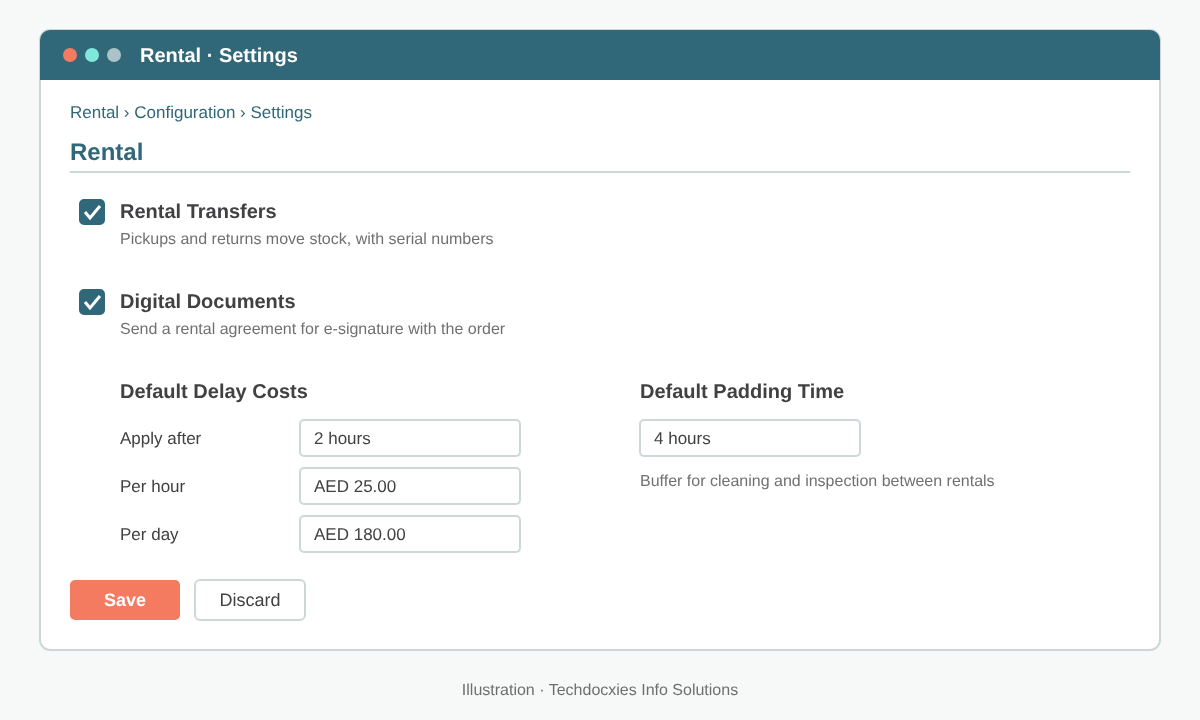
Rental settings: switch on stock transfers, set late-return fees and add a buffer between bookings.
Step 2: Make your products rentable and price them by period
Open the product from Rental › Products (or from Inventory or Sales) and tick Rental, the checkbox that marks it as rentable. A new pricing tab lets you set prices per period, for example per hour, per day, per week and per month. Odoo picks the cheapest combination that covers the booked duration, so a nine-day booking can be charged as one week plus two days rather than nine daily rates.
A product can be sold and rented at the same time. That suits a trader who sells new generators and rents out a demo fleet. If you want to keep the rental fleet apart from saleable stock, track the rental units by serial number and give them their own location.
| Example product (Gulf Power Rentals LLC) | Per day | Per week | Per month |
|---|---|---|---|
| Generator 60 kVA | AED 600 | AED 3,200 | AED 10,500 |
| LED floodlight tower | AED 160 | AED 850 | AED 2,900 |
| Scissor lift 10 m | AED 450 | AED 2,400 | AED 7,800 |
Pro tip: Set up a service product called "Refundable security deposit" and add it to rental quotations through an optional product or a quotation template. When the goods come back in good condition, issue a credit note for the deposit line. Your deposit liability then stays visible and reconcilable in Accounting instead of sitting in someone's notebook.
Step 3: Create rental orders and check availability
Go to Rental › Orders and click New. Choose the customer, set the rental period (start and return date and time) and add the products. Odoo calculates the price from the duration and your pricing rules, and shows whether enough units are free for those dates. Send the quotation by email or share the portal link. The customer can then sign and pay online if you have enabled online signature and payment in your Sales settings.
Use the schedule (Gantt) view in Rental to see every booking by product. Your operations team can spot clashes, gaps and idle units at a glance, which is far quicker than scrolling through a list.
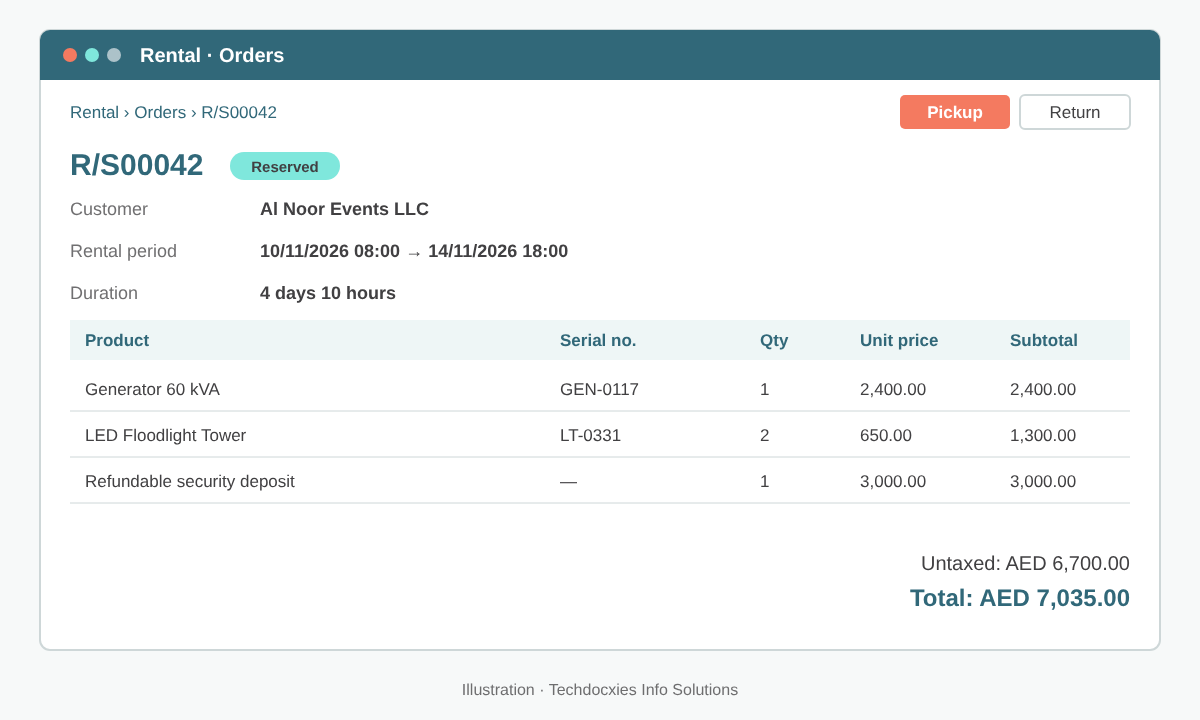
A confirmed rental order with the rental period, serial-tracked units and a deposit line.
Step 4: Handle pickups and returns
Once the order is confirmed, the units are reserved. On the day of collection or delivery, click Pickup on the order, confirm the quantities and, for tracked items, pick the exact serial numbers handed over. With Rental Transfers enabled, this validates a delivery out of your warehouse.
When the equipment comes back, click Return. Record what actually came back and inspect each unit. Log any damage in the chatter and add a charge line (for example "Damage – cracked lens") before invoicing. If the return is past the agreed time plus the grace period, Odoo adds the delay cost to the order automatically.
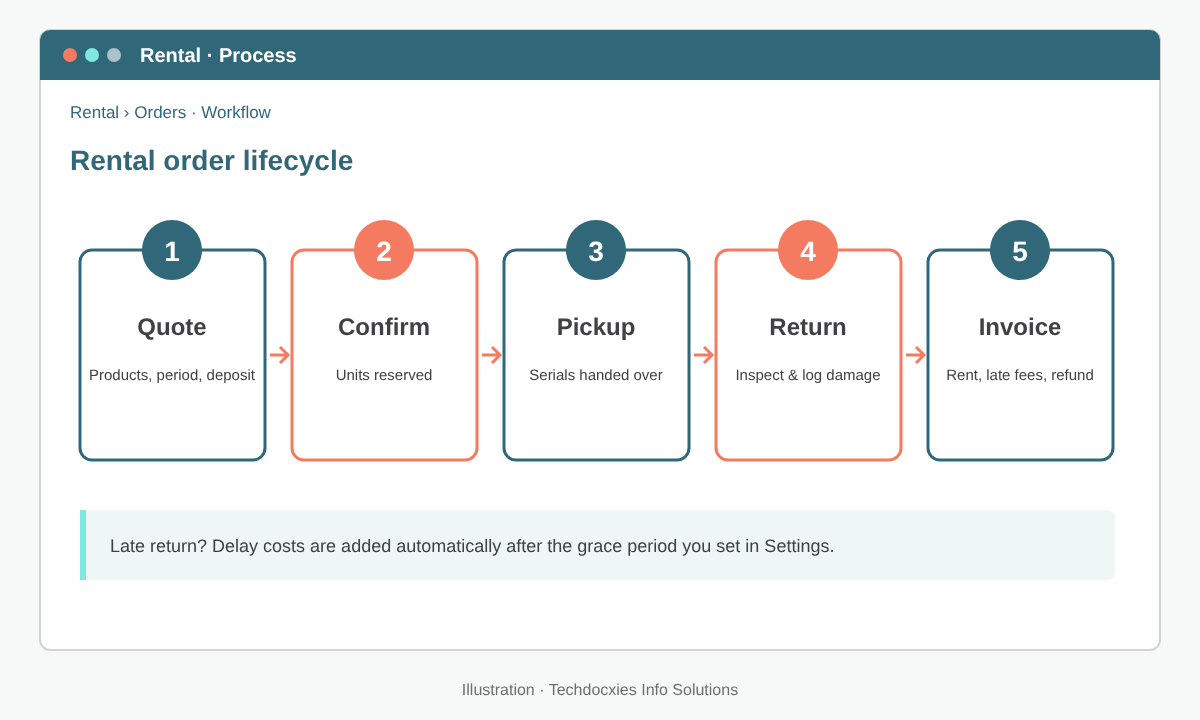
The five stages of a rental order, from quotation to final invoice.
Watch out: If you sell and rent the same product without serial numbers, rented units and saleable units sit in one pool. A sales team chasing a target can sell the unit your rental desk promised to a customer next week. Serial-track your rental fleet, or run the fleet as a separate product, before you go live.
Step 5: Invoice rentals, late fees and long-term contracts
Rental orders are sales orders, so you invoice them the same way. Use Create Invoice on the order, either up front, at return, or as a down payment followed by a final invoice. The invoice picks up your VAT setup, so UAE and KSA customers get compliant 5% or 15% VAT lines without extra work. Late fees and damage lines added at return flow into the same invoice.
For long-term hire, such as a generator on a construction site for six months, consider monthly billing. Odoo 19 can bill rentals on a recurring basis through the Subscriptions app, depending on the apps in your plan. If that's not in your plan, raise down-payment invoices month by month.
Step 6: Track utilisation and profitability
Use Rental › Reporting to analyse revenue by product, customer and period, and to see how many days each item was out on hire. Compare that with the purchase cost of each unit to find which equipment pays for itself and which sits in the yard.
Go-live checklist
- ☐ Rental Transfers, delay costs and padding time configured
- ☐ Rental products ticked and priced per hour, day, week and month
- ☐ Rental fleet serial-numbered and stored in its own location
- ☐ Security deposit product and refund process agreed with Finance
- ☐ Rental terms and conditions added to quotations
- ☐ Pickup and return inspection steps documented for warehouse staff
- ☐ Opening bookings and units currently on hire loaded before cut-over
OUR EXPERTISE
How Techdocxies Helps with Odoo Rental
Techdocxies Info Solutions has delivered 50+ Odoo projects for trading, distribution and service businesses across the GCC and beyond. We don't just switch modules on — we map your real processes first, then configure, customise, migrate, train and back you with 24/7 support.
- Rental pricing design: hourly, daily, weekly and monthly rates, plus customer-specific pricelists
- Serial-number setup and separate locations so your rental fleet and saleable stock never clash
- Security deposit, damage-charge and late-fee processes that reconcile cleanly in Accounting
- Recurring billing for long-term hire, with VAT-compliant invoices for UAE, KSA and Oman
- Migration of your current bookings, fleet register and on-hire units from spreadsheets or legacy systems