
Every GCC business runs on small cash: courier fees, a taxi to a customer site, water and tea for the office, a quick stationery run. Individually these amounts are tiny, but across a year they add up to thousands of rials or dirhams that often sit outside the books until someone hands over a bag of receipts. Odoo 19 has no separate "petty cash module", and it doesn't need one. A dedicated cash journal, a clear float policy and a monthly count give you a petty cash box that always reconciles. This guide walks through the setup we use with clients.
Step 1: Decide your petty cash policy before touching Odoo
Most petty cash problems start with unclear rules, not with the software. Agree these points with management first:
| Policy item | Example (Al Noor Trading LLC, Muscat) |
|---|---|
| Float method | Imprest: fixed float of OMR 300, topped back up to that amount |
| Custodian | One named office administrator per box; a backup for leave periods |
| Spending limit | Maximum OMR 50 per voucher; anything above goes through purchase or expenses |
| Evidence | Signed voucher plus original receipt (VAT invoice where available) |
| Top-up trigger | When the balance falls below OMR 75, or monthly at the latest |
| Count frequency | Surprise count quarterly, formal count on the last working day of the month |
For branches, create one box (and one journal) per location. Mixing branch cash into a single journal makes counts impossible to reconcile.
Step 2: Create the petty cash account and journal
Go to Accounting › Configuration › Chart of Accounts and create a current-asset account of type Bank and Cash, for example 101510 Petty Cash – Head Office. Then open Accounting › Configuration › Journals and create a new journal:
- Type: Cash, with a short code such as PCHO.
- Cash Account: the petty cash account you just created.
- Suspense Account: keep the company default unless your auditors want a separate one.
- Profit / Loss accounts: set these to a "Cash Difference" income and expense account so count differences post cleanly.
- Currency: leave empty for company currency, or set it if the box holds foreign cash.
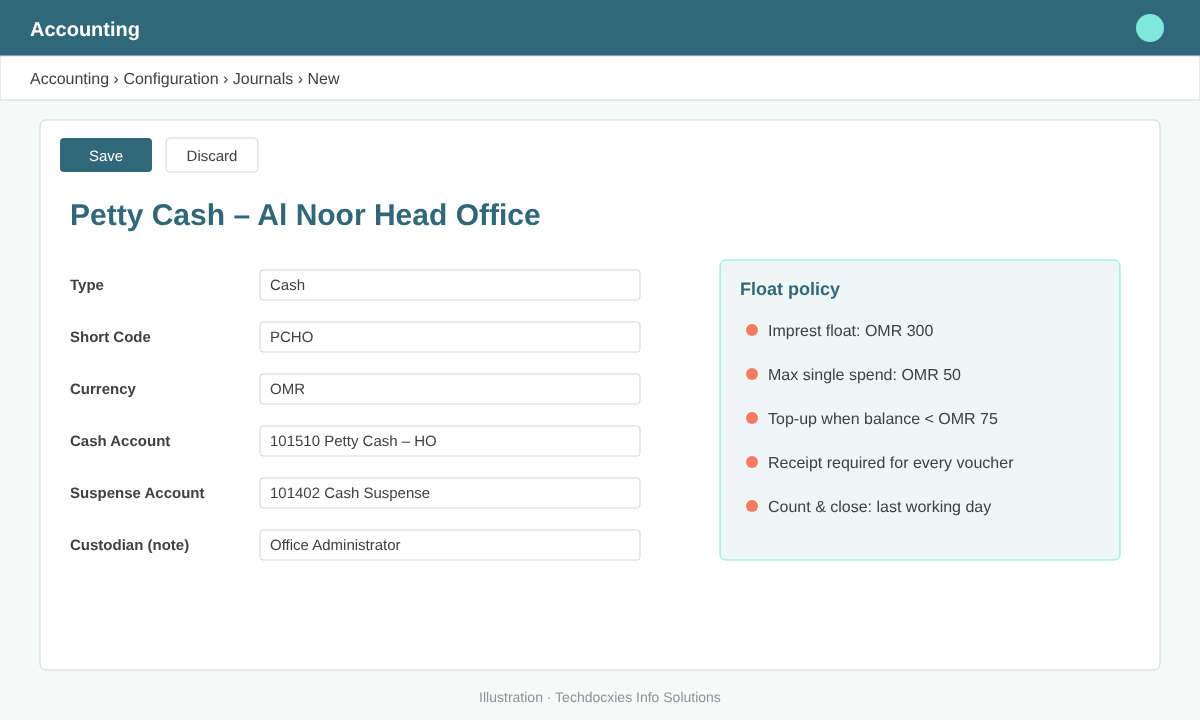
The petty cash journal is a normal Cash-type journal with its own account and a written float policy.
Step 3: Fund the float with an internal transfer
The opening float and every top-up are transfers from your bank, not expenses. Record the withdrawal on the bank journal and the matching receipt on the petty cash journal, then reconcile both sides against your company's internal transfer (liquidity transfer) account. Once both legs are matched, the transfer account nets to zero and the cash balance on the Accounting › Dashboard card shows the new float.
Pro tip: With an imprest float, the top-up amount always equals the total of vouchers spent since the last top-up. If the cheque or transfer amount doesn't match the reconciled spending, you know immediately that something is missing, before month-end.
Step 4: Record spending as it happens
You have two good options, and many companies use both:
- Direct cash lines: From the petty cash card on the Accounting Dashboard, add a new transaction for each voucher with date, label, partner (if known) and amount as a negative value. Reconcile it against the right expense account, applying the input VAT tax where you hold a valid tax invoice.
- Expenses app: If staff already use Expenses to photograph receipts, they can log the spend there with the expense marked as paid by the company. In Expenses › Configuration › Settings, set the company-paid payment option to use the petty cash journal, so posting the expense credits petty cash rather than a bank account.
The Expenses route gives you receipt attachments, manager approval and analytic tagging out of the box. Direct lines are faster for a custodian keying a week of small vouchers in one sitting.
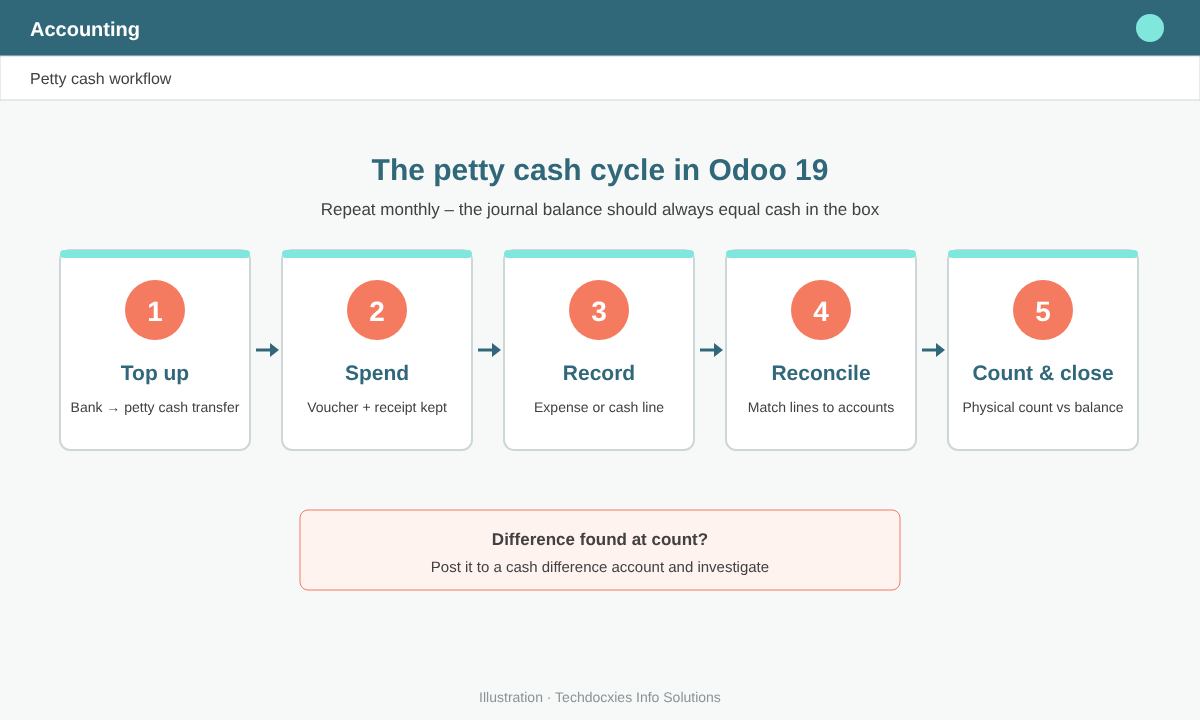
The monthly petty cash cycle: top up, spend, record, reconcile, count and close.
Step 5: Reconcile and count at month-end
On the last working day, the custodian counts the box and a second person witnesses it. In Odoo, open the petty cash journal and make sure every line is reconciled. The journal balance should equal the physical cash. Use this checklist:
- ☐ All vouchers for the month are entered and reconciled
- ☐ VAT applied only where a valid tax invoice exists
- ☐ Physical count matches the closing balance
- ☐ Any difference posted to the cash difference account with an explanation
- ☐ Count sheet signed and attached to the closing entry
- ☐ Top-up requested for the amount spent
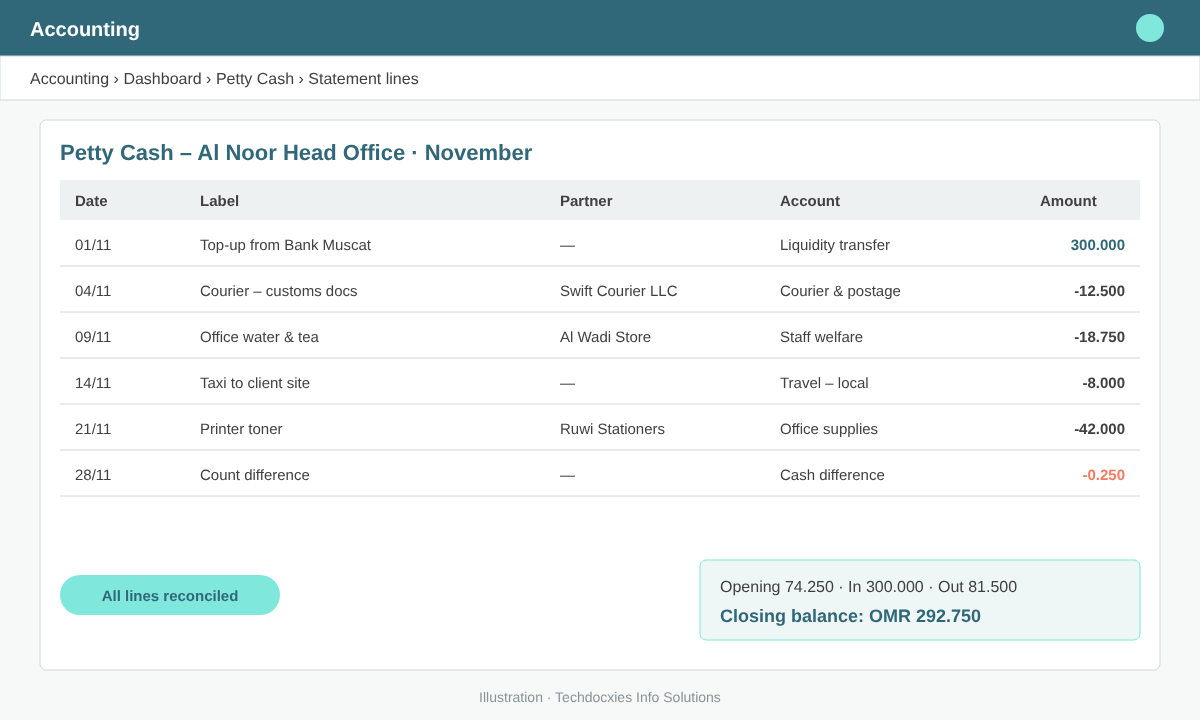
A reconciled month of petty cash: every line matched, with a small count difference shown separately.
Watch out: Don't "fix" a shortage by editing an old voucher amount or backdating a line. Post the difference on the count date to the cash difference account. Repeated small differences are a control signal worth investigating, and hiding them inside expense lines destroys your audit trail.
Step 6: Protect closed periods and review regularly
After the month is closed, set a lock date in Accounting so nobody can post or change entries in that period. Then review petty cash monthly through Accounting › Reporting › General Ledger, filtered on the petty cash account, and analyse spending by expense account to spot categories that should move to proper purchase orders or vendor contracts. If petty cash spend on one supplier keeps growing, that supplier probably belongs on credit terms.
Bringing it together
A well-run petty cash box in Odoo 19 is simple: one Cash journal per box, an imprest float, every voucher recorded and reconciled, and a witnessed monthly count. Done this way, petty cash stops being the last thing finance chases at month-end and becomes just another journal that closes on time.
OUR EXPERTISE
How Techdocxies Helps with Petty Cash
Techdocxies Info Solutions has delivered 50+ Odoo projects for trading, distribution and service businesses across the GCC and beyond. We don't just switch modules on — we map your real processes first, then configure, customise, migrate, train and back you with 24/7 support.
- Design petty cash policies, float limits and approval rules that fit your branches
- Configure cash journals, cash difference accounts and internal transfer flows
- Connect the Expenses app so staff receipts post straight to petty cash
- Set up VAT treatment for small receipts in line with Oman, UAE and KSA rules
- Build month-end count checklists, reports and lock-date routines for your finance team