
Group finance teams across the GCC know the month-end routine: export trial balances from each company, paste them into a master spreadsheet, convert currencies by hand, strip out inter-company sales and hope the balance sheet still balances. Odoo 19 lets you run every group company in one database, which takes most of that copy-and-paste out of the process. This guide walks through a practical setup for an invented group, Gulf Horizon Holding, which owns a UAE trading company, an Omani subsidiary reporting in OMR and a Saudi company reporting in SAR.
Step 1: Structure your companies correctly
Open Settings › Companies › Manage Companies and create one company per legal entity, each with its own country, currency, VAT number and fiscal localization. Create the holding company first, then the subsidiaries. Odoo also lets you set a parent company to create branches, but branches share their parent's fiscal setup, so use them only for divisions or locations of the same legal entity. A separate legal entity with its own trade licence, VAT registration or currency should be a separate company.
Next, give your finance users access to all group companies from their user record under Settings › Users & Companies › Users. Operational staff should normally see only their own company.
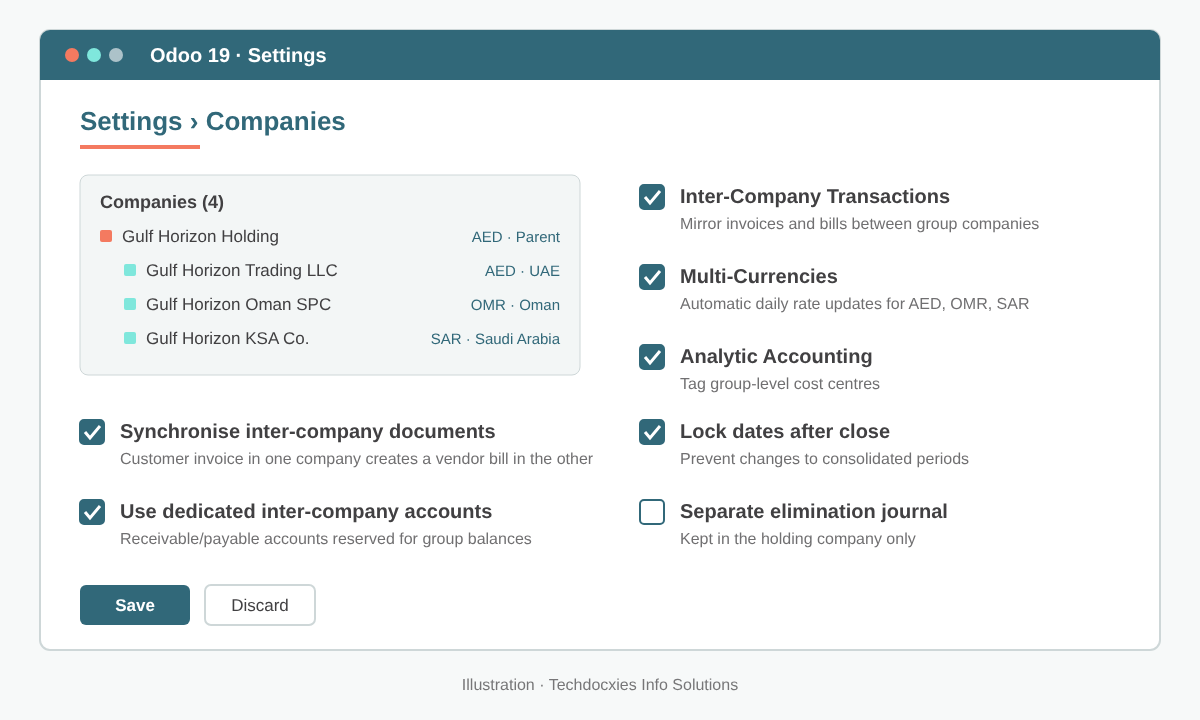
Four companies in one database, with inter-company and multi-currency features switched on.
Step 2: Align charts of accounts for group reporting
Each company gets its chart of accounts from its country localization, so the UAE, Oman and Saudi charts will not match out of the box. Before going live, agree on a group numbering convention and review each chart in Accounting › Configuration › Chart of Accounts. At a minimum, keep the same codes and names for revenue, cost of sales, inter-company receivables and payables, inter-company revenue and cost, and investment in subsidiaries. When the codes match, combined reports line up neatly and eliminations are easy to identify.
Step 3: Automate inter-company transactions
In Settings, under the Companies section, enable Inter-Company Transactions. For each company you can then choose whether a confirmed sale or posted invoice in one company automatically creates the matching purchase or vendor bill in the other. Every company also exists as a contact, so set each one up as a customer and vendor of its sister companies, with dedicated inter-company receivable and payable accounts on those contacts. That way, group balances never get mixed with third-party debtors and creditors.
Pro tip: Create a separate “Inter-company” revenue and cost account in every company, and set it on the inter-company contacts through a fiscal position that maps the normal sales and purchase accounts. Group sales then land in their own account automatically, and the elimination entry becomes a simple read of one balance.
Step 4: Configure currencies and exchange rates
Go to Accounting › Configuration › Settings and, in the Currencies section, turn on automatic currency rate updates with a provider and interval that suit you. Gulf Horizon Holding reports in AED, so the OMR and SAR rates must be current on the closing date. When you view reports with several companies selected, Odoo shows the figures in one currency using the rates in the database.
Watch out: A combined report in Odoo is a fast management view, not a full IFRS translation. Under IAS 21 you translate assets and liabilities at the closing rate, income and expenses at average rates and equity at historical rates, and post the difference to a translation reserve. If your auditors need that level of detail, calculate the translation adjustment at each close and post it in the holding company, and agree the method with them before the first year-end.
Step 5: Run combined reports
Use the company switcher in the top bar to tick the holding company and every subsidiary, then open Accounting › Reporting › Balance Sheet or Profit and Loss. Odoo combines the selected companies into a single report that you can drill into, compare with previous periods and export to Excel or PDF. Group controllers can also run the trial balance and aged receivables across all companies in the same way to check inter-company balances before eliminating them.
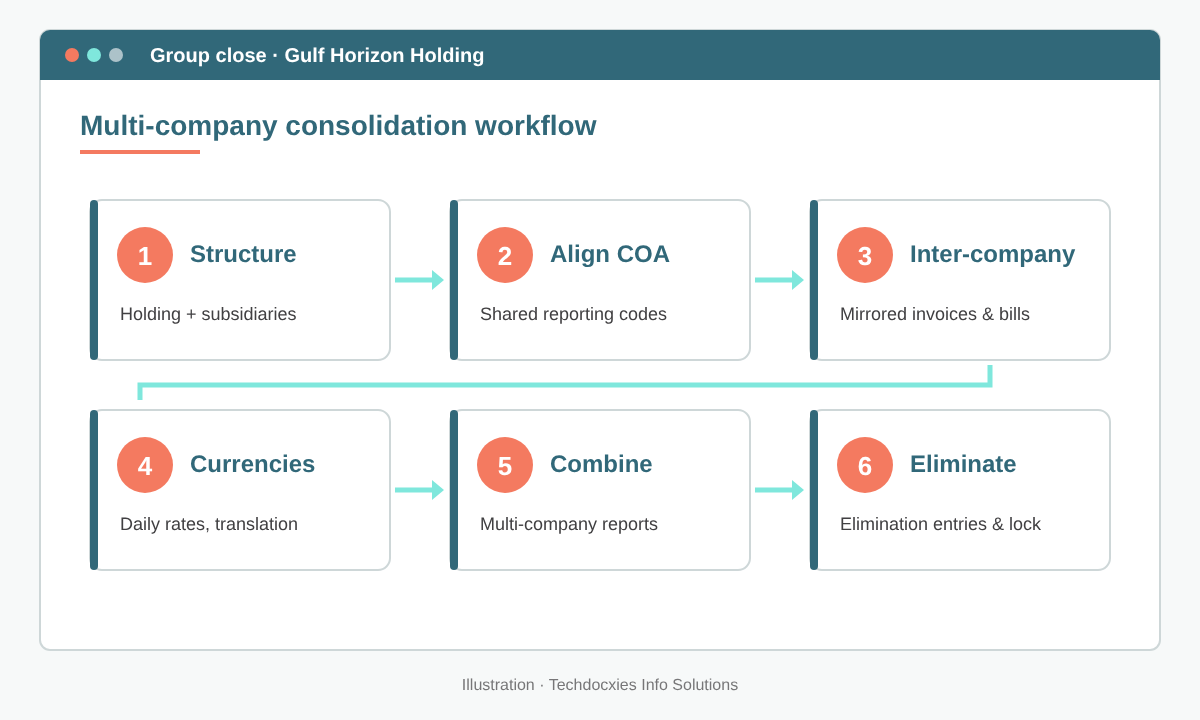
The group close in six steps, from company structure to elimination entries.
Step 6: Post elimination entries
Combined figures still include sales between group companies and the matching receivables and payables. Remove them with elimination entries. Create a dedicated miscellaneous journal named “Consolidation Eliminations” in the holding company, then post entries through Accounting › Accounting › Journal Entries that reverse inter-company revenue against inter-company cost and net inter-company receivables against payables. Set an automatic reversal date on the first day of the next period so each month starts clean.
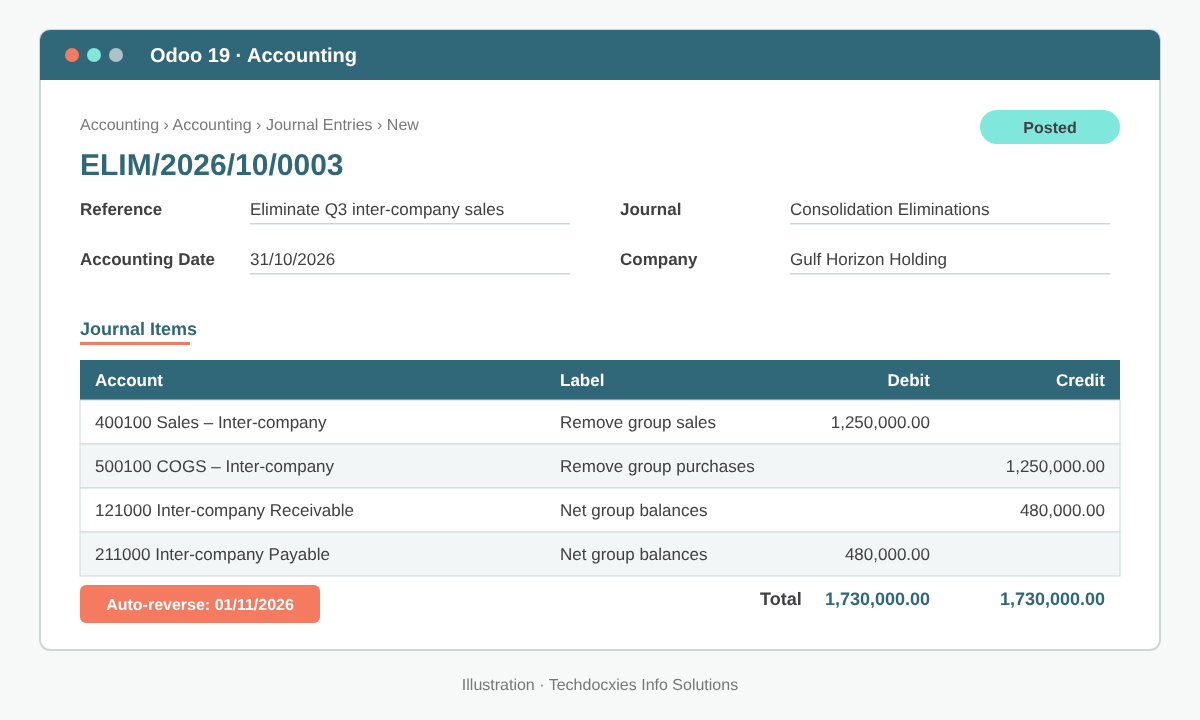
An elimination entry in the holding company, set to reverse automatically at the start of the next month.
Step 7: Make the close a repeatable routine
Consolidation only works when every company closes on time. Use this checklist each month:
| Task | Owner | Day |
|---|---|---|
| Post all invoices, bills and bank statements in each company | Company accountant | WD 1–3 |
| Reconcile inter-company receivables and payables; agree differences | Company accountants | WD 3 |
| Confirm closing and average exchange rates | Group controller | WD 3 |
| Set lock dates in each subsidiary | Finance manager | WD 4 |
| Post elimination and translation entries in the holding company | Group controller | WD 4 |
| Run combined balance sheet and P&L; review and sign off | CFO | WD 5 |
Lock each subsidiary's period before eliminating. If a late bill is posted after you have eliminated, the group numbers stop matching and the whole exercise has to be repeated.
OUR EXPERTISE
How Techdocxies Helps with Multi-Company Consolidation
Techdocxies Info Solutions has delivered 50+ Odoo projects for trading, distribution and service businesses across the GCC and beyond. We don't just switch modules on — we map your real processes first, then configure, customise, migrate, train and back you with 24/7 support.
- Design your company, branch and user-access structure for UAE, KSA, Oman and other GCC entities
- Harmonise charts of accounts across localizations for clean group reporting
- Set up inter-company rules, accounts and fiscal positions so group transactions post themselves
- Build elimination and currency translation procedures your auditors will accept
- Create consolidated management reports and train your finance team on the monthly close