
Payroll is the one process where employees notice every mistake. A missed allowance, wrong overtime or an unpaid leave deduction quickly turns into complaints and manual corrections. Odoo Payroll calculates salaries from the employee's contract terms, work entries and salary rules, then posts everything straight to accounting.
In Part 2 of our Odoo HRMS series, we set up Odoo Payroll: localisation, structure types, salary structures and rules, work entries, other inputs, payslip batches and accounting.
Step 1: Install Payroll and your localisation
Install the Payroll app, then check whether a payroll localisation exists for your country (Odoo provides several, including UAE and Saudi Arabia). A localisation brings ready-made structures and rules for that country's allowances, social insurance and end-of-service benefits. Where none exists, you build a generic structure — which is what most companies in other GCC countries and many international firms do.
In Payroll › Configuration › Settings, enable Payroll Entries so payslips post journal entries, and choose the salary journal.
Step 2: Define structure types and salary structures
A Structure Type groups employees paid the same way (e.g. Monthly Staff, Hourly Workers) and sets the default working schedule and wage type. Inside it, a Salary Structure defines the list of rules computed on each payslip, for example Regular Pay, Final Settlement or Bonus Run.
Go to Payroll › Configuration › Structure Types and Structures to create them, then assign the structure type on each employee's contract details.
Step 3: Build salary rules
Salary rules are the heart of payroll. Each rule has a code, a category (Basic, Allowance, Gross, Deduction, Net), a sequence and a computation: a fixed amount, a percentage of another rule, or a Python expression for more complex logic.
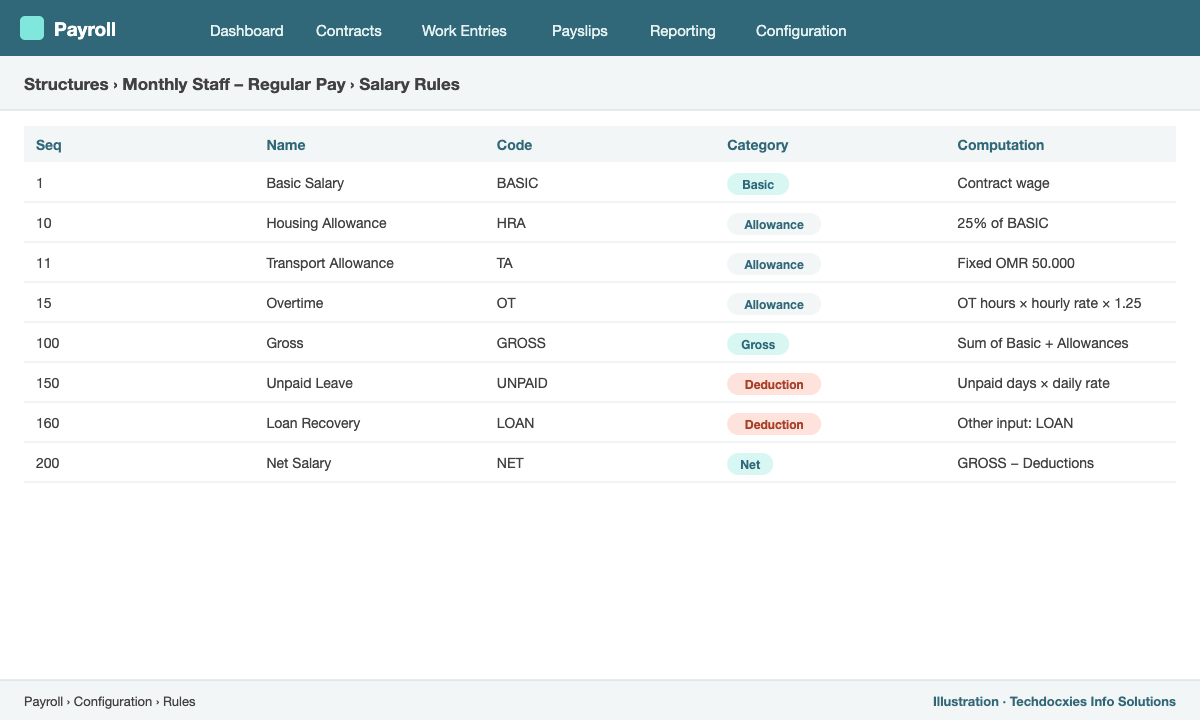
Salary rules in a monthly structure: categories, sequence and computation
A typical monthly structure for a trading company might include:
- BASIC – basic salary from the contract wage.
- HRA and TA – housing and transport allowances, fixed or as a percentage of basic.
- OT – overtime from approved attendance or work entries.
- GROSS – sum of basic and allowances.
- SOCIAL – employee social insurance contribution where applicable.
- UNPAID – deduction for unpaid leave days.
- LOAN – salary advance recovery from other inputs.
- NET – gross minus deductions.
Step 4: Work entries – where time meets payroll
Work entries are generated from each employee's working schedule and contract details, then adjusted by time off and, if you use it, attendance. In Payroll › Work Entries you see a calendar of each employee's attended days, paid leave, sick leave and unpaid leave. Conflicts (for example, leave not yet approved) are highlighted and must be resolved before payslips are generated, so the payslip always matches reality.
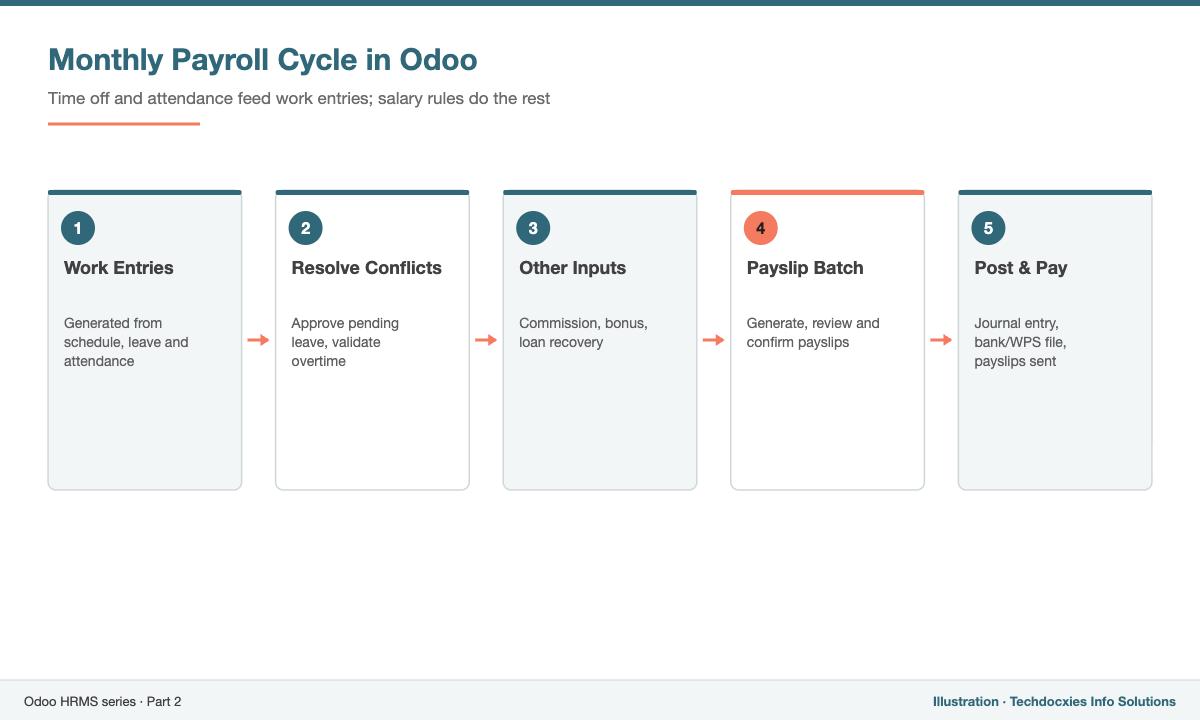
From working schedule to posted payroll
Step 5: Other inputs for variable items
Commissions, bonuses, fines and advance recoveries change every month. Define them under Payroll › Configuration › Other Input Types, then enter amounts on the payslip (or import them in bulk). Your salary rules read these inputs by code, e.g. inputs.COMMISSION.amount.
Step 6: Run payroll with payslip batches
- Go to Payroll › Payslips › Batches › New and set the period (e.g. 1–31 October).
- Click Generate Payslips, selecting a department or all employees.
- Review the computed payslips; open any payslip to see each rule's amount and the worked days.
- Click Create Draft Entry to post the payroll journal entry, then Mark as Paid after payment.
- Email or publish payslips to employees through the employee portal.
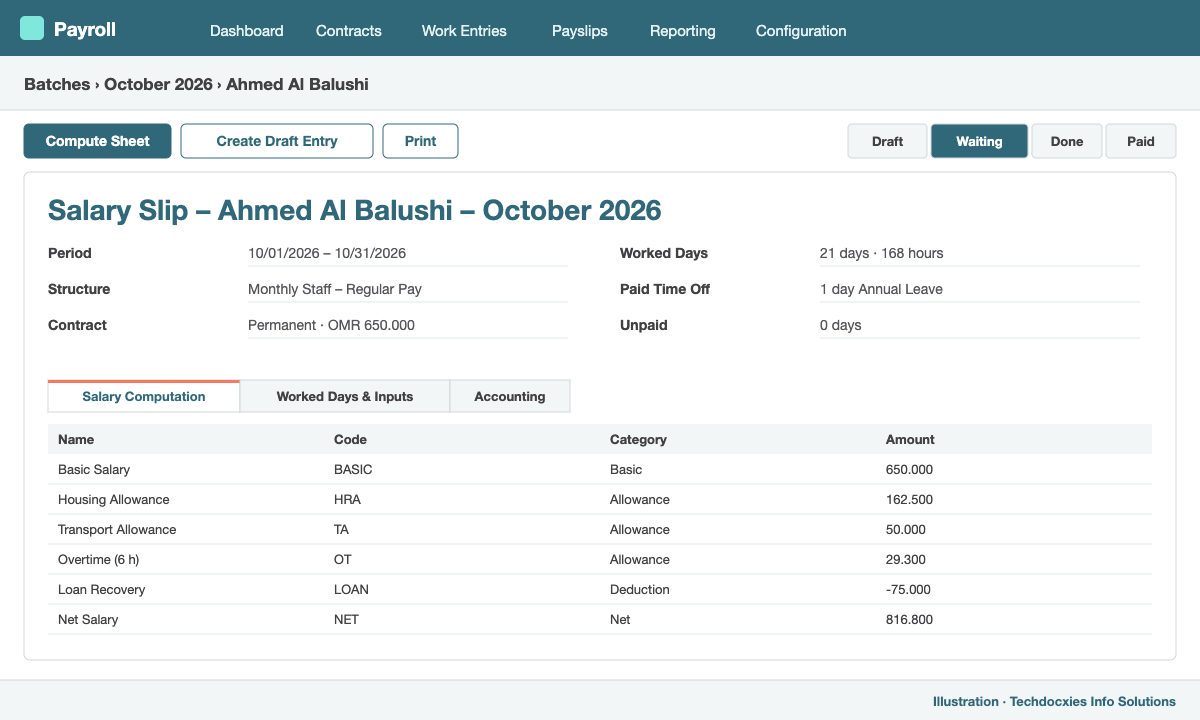
A computed payslip showing worked days and each salary rule
Step 7: Accounting and salary transfer
Each salary rule can carry a debit and credit account, so the payroll entry splits expenses by type (basic salary, allowances, overtime) and liabilities (net salaries payable, social insurance payable). Add analytic distribution to charge salaries to departments or branches. For salary transfers, export a bank file; for Wage Protection System (WPS) formats, use your localisation where available or a custom report.
Next in the series: Part 3 – Odoo Timesheets: tracking time, approvals and billing customers.
Our Expertise
How Techdocxies Helps with Odoo Payroll
Techdocxies Info Solutions has delivered 50+ Odoo projects for trading, distribution and service businesses across the GCC and beyond. We don't just switch modules on — we map your real processes first, then configure, customise, migrate, train and back you with 24/7 support.
- Salary structure and rule design matched to your existing payroll sheets, validated by parallel runs
- End-of-service gratuity, leave salary and air-ticket accrual rules
- Social insurance and WPS salary file formats for your country
- Payroll journal mapping and analytic allocation with your finance team
- Payroll migration with year-to-date balances and loan histories