
Every HR, payroll and timesheet process in Odoo starts from one place: the employee record. When departments, job positions, working schedules and contract details are set up cleanly, payroll calculates correctly, time off balances are right and managers get accurate reports without chasing spreadsheets.
This is Part 1 of our Odoo HRMS series. We set up the HR foundation in Odoo 19: company structure, employee records, working schedules, contract details, time off and attendance.
Step 1: Build your organisation structure
- Departments – go to Employees › Departments and create your departments (Sales, Warehouse, Finance, Operations), each with a manager. Sub-departments are supported, and the manager drives approval flows for time off and expenses.
- Job Positions – under Employees › Configuration › Job Positions, define roles such as Storekeeper, Sales Executive and Accountant. These also feed the Recruitment app if you use it.
- Working Schedules – under Employees › Configuration › Working Schedules, define hours per day and days per week, e.g. Sunday–Thursday, 8 hours or a 6-day warehouse shift. Schedules are used by time off, attendance, planning and payroll.
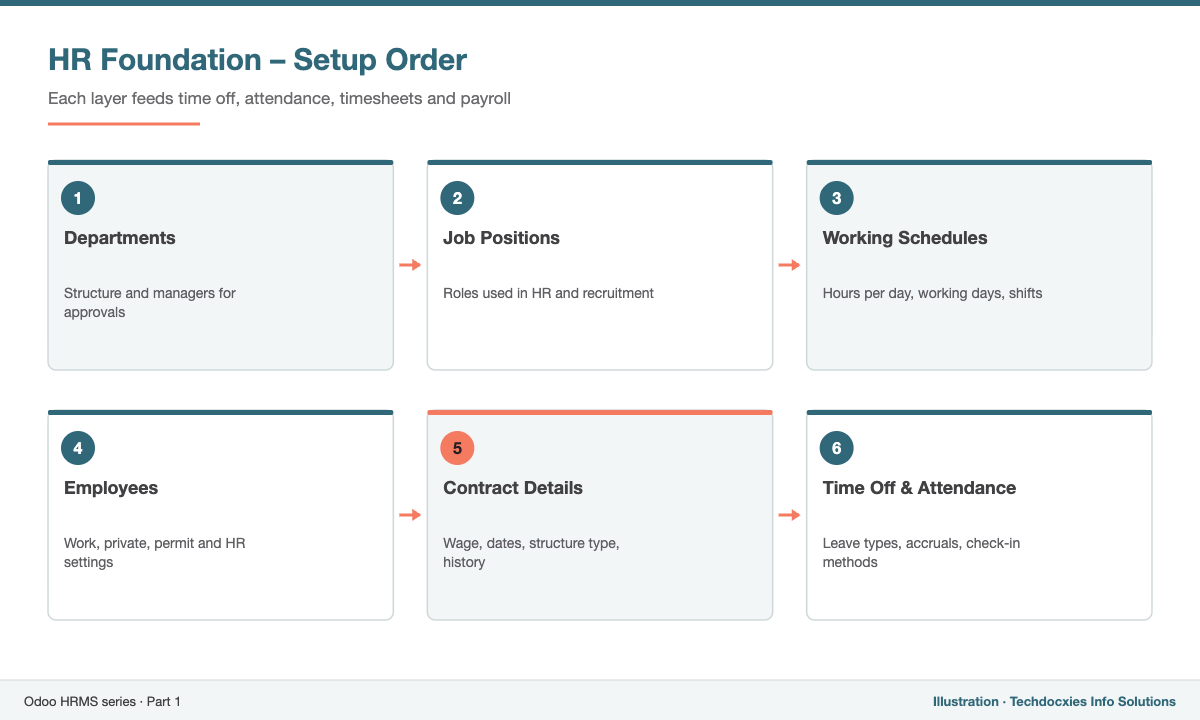
The order to set up your HR foundation in Odoo
Step 2: Create complete employee records
Go to Employees › New. Beyond name and photo, fill in the details that downstream apps rely on:
- Work Information – department, job position, manager, coach, working schedule and timezone.
- Private Information – address, nationality, identification and passport number, emergency contact and bank account (used for salary transfers).
- Work Permit – visa and work permit numbers with expiry dates, essential for expatriate staff in the GCC.
- HR Settings – related user (so the employee can log in and request time off), badge ID or PIN for attendance kiosks, and hourly cost used by timesheets.
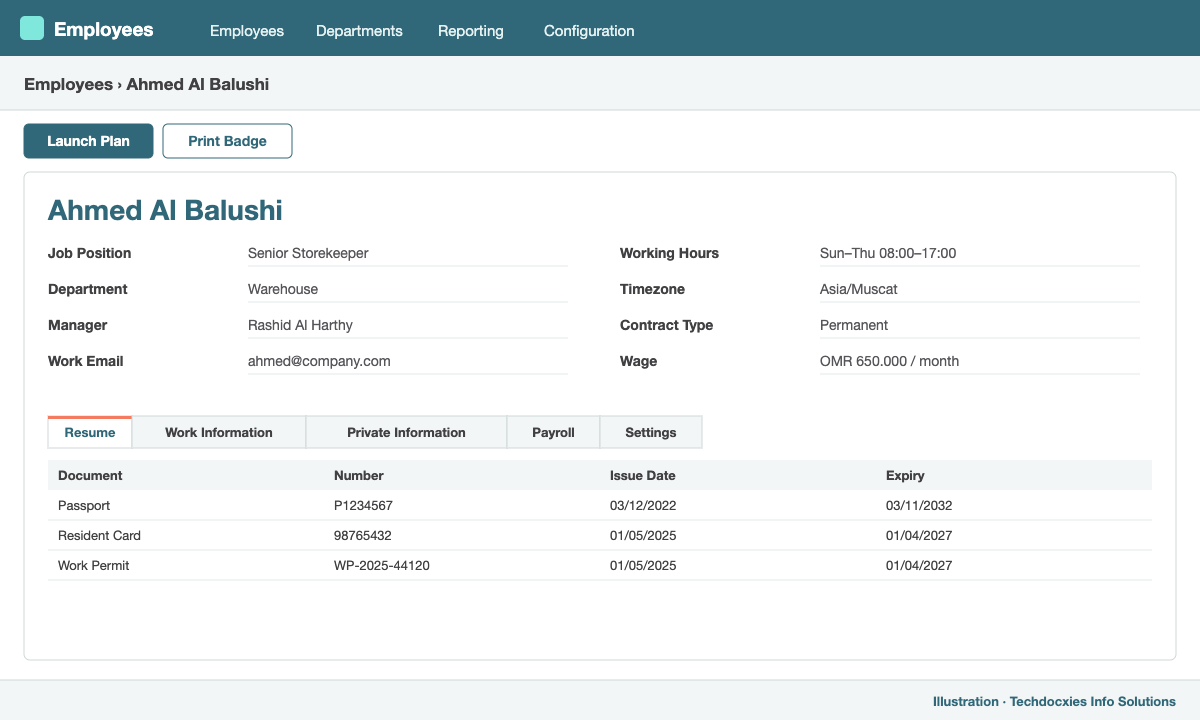
An employee record with work information, schedule and manager filled in
Step 3: Contract details and history
In Odoo 19, contract terms are managed directly on the employee: contract type, start and end dates, wage, working schedule and salary structure type. When something changes — a promotion, a salary increase or a new schedule — you record a new version from a given date, and Odoo keeps the full history. Payroll always uses the terms valid for the period it is calculating, so mid-month changes are prorated correctly.
Step 4: Configure time off
Install Time Off and go to Time Off › Configuration › Time Off Types. Create types such as Annual Leave, Sick Leave, Unpaid Leave, Hajj Leave and Maternity Leave, each with its approval rule (manager, HR officer, both or none) and whether it requires an allocation.
Then set up Accrual Plans so annual leave is earned automatically (e.g. 2.5 days per month, with a carry-over cap). Public holidays go into Time Off › Configuration › Public Holidays and are excluded from leave calculations.
Step 5: Track attendance
The Attendances app records check-in and check-out from a kiosk (badge, PIN or face-to-camera), the web, the mobile app, or biometric devices through an integration. Overtime is calculated against the working schedule and can be approved before it reaches payroll.
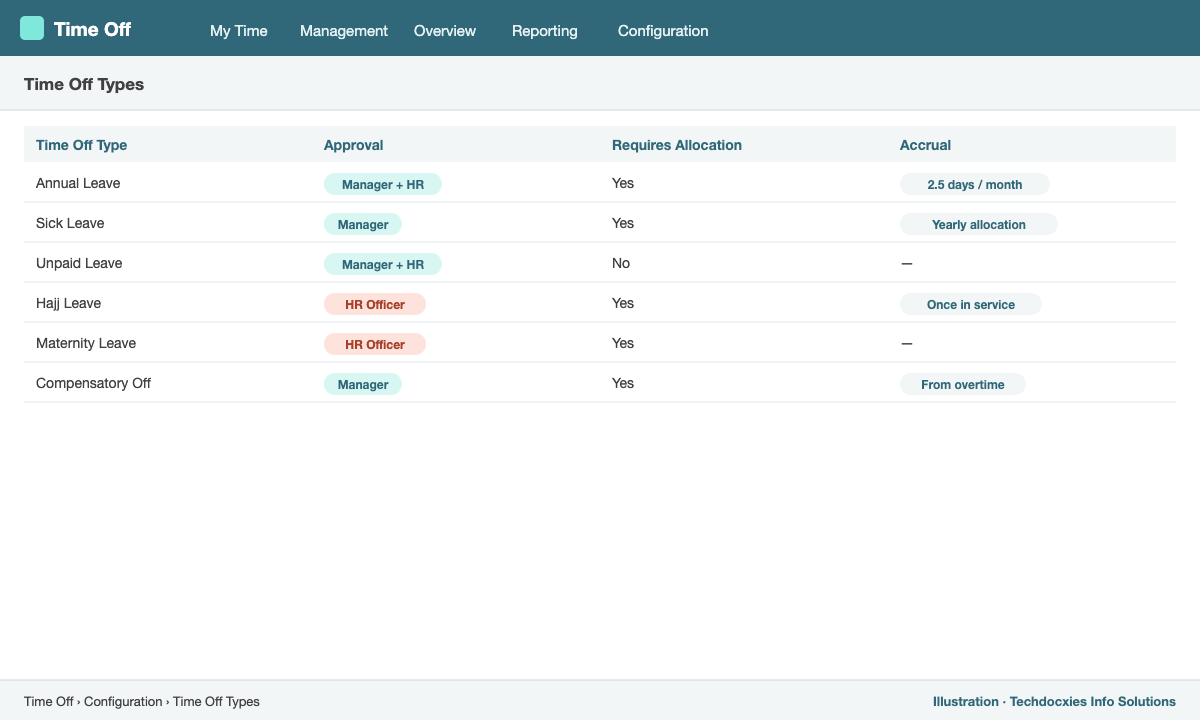
Time off types with approval rules and allocation requirements
HR foundation checklist
| Item | Where in Odoo | Done? |
|---|---|---|
| Departments and managers | Employees › Departments | ☐ |
| Job positions | Employees › Configuration › Job Positions | ☐ |
| Working schedules | Employees › Configuration › Working Schedules | ☐ |
| Employee records with documents and bank details | Employees | ☐ |
| Contract terms and salary structure type | Employee form › Payroll / contract details | ☐ |
| Time off types, accruals and public holidays | Time Off › Configuration | ☐ |
Next in the series: Part 2 – Odoo Payroll: salary structures, rules, work entries and payslip batches.
Our Expertise
How Techdocxies Helps with Odoo HRMS
Techdocxies Info Solutions has delivered 50+ Odoo projects for trading, distribution and service businesses across the GCC and beyond. We don't just switch modules on — we map your real processes first, then configure, customise, migrate, train and back you with 24/7 support.
- Org structure and employee data migration from Excel or legacy HR systems
- Leave policies and accrual plans configured to your HR manual and local labour law
- Document and visa/work permit expiry alerts for expatriate staff
- Biometric attendance device integration
- Employee self-service rollout with mobile app training