
For importers, the supplier's invoice price is only part of the story. Freight, insurance, customs duty, clearing and inland transport can add 10–30% to the real cost of a product. If those costs don't reach your product cost, every margin report you look at is wrong.
In the final Part 5 of our Odoo Trading series, we set up Odoo for import and export trading: multi-currency purchasing, Incoterms, landed costs and dropshipping.
Step 1: Configure currencies and exchange rates
Go to Accounting › Configuration › Settings › Currencies. Activate the currencies you trade in (USD, EUR, CNY, INR…) and enable Automatic Currency Rates, choosing a rate provider and an update interval (daily is typical). Odoo then converts purchase orders, vendor bills and payments into your company currency at the right date and books realised exchange gains or losses when you pay.
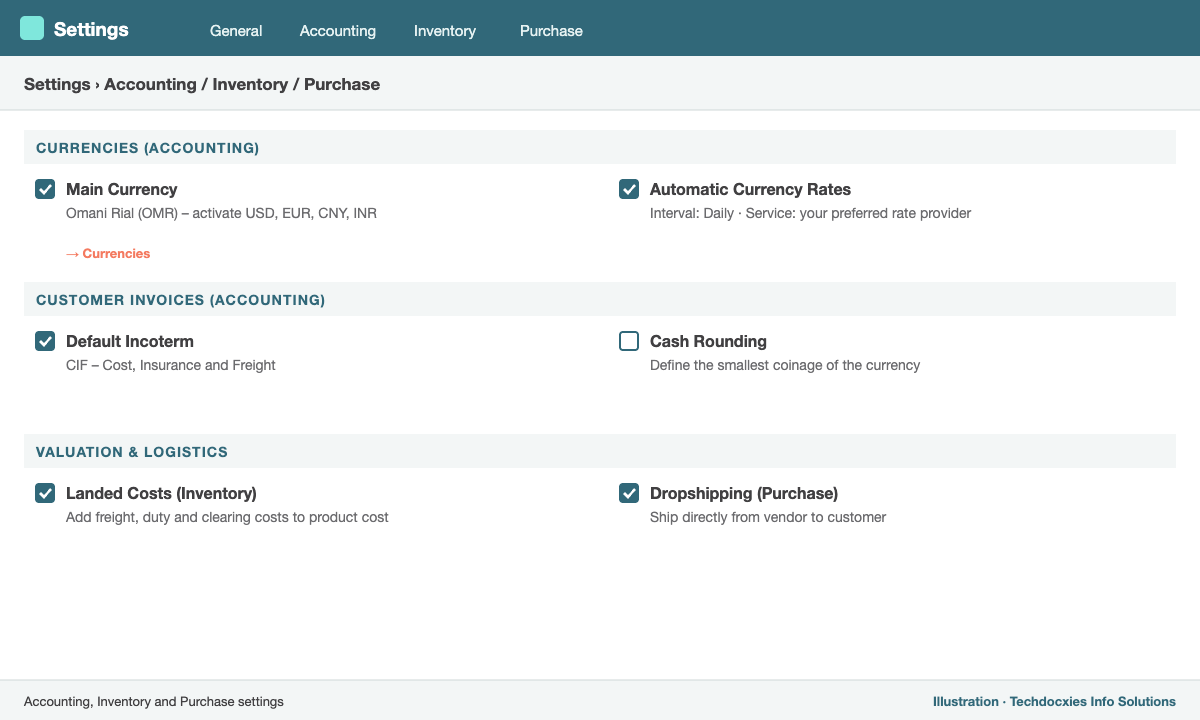
The settings that power import trading: currencies, Incoterms, landed costs and dropshipping
Step 2: Record Incoterms on every deal
Incoterms (EXW, FOB, CFR, CIF, DAP, DDP…) define who pays for freight and insurance and where risk transfers. Set a Default Incoterm in Accounting settings, and override it per purchase or sales order in the Other Information tab. The Incoterm prints on your documents and tells your team immediately whether freight and insurance must be added as landed costs.
Step 3: Set up landed costs
Landed costs let you add import charges to the value of the goods you received. Enable Landed Costs in Inventory › Configuration › Settings. Make sure the products concerned use FIFO or AVCO with automated valuation (see Part 1) — landed costs only work with perpetual valuation.
Then create service products for each type of charge — Sea Freight, Customs Duty, Clearing & Forwarding, Inland Transport — and on each one tick Is a Landed Cost, choosing a default split method:
| Split method | Allocates cost by | Typical use |
|---|---|---|
| Equal | Same amount per product line | Fixed document fees |
| By Quantity | Number of units | Handling charges |
| By Current Cost | Value of each line | Customs duty, insurance |
| By Weight / By Volume | Product weight or volume | Sea and air freight |
Step 4: Apply landed costs to a shipment
- Receive the goods against the purchase order as usual.
- When the freight forwarder's or customs bill arrives, record it as a vendor bill using your landed cost products.
- Click Create Landed Costs on the bill (or go to Inventory › Operations › Landed Costs › New).
- Select the related receipt(s) — one container can cover several POs.
- Click Compute to see how much each product absorbs in the Valuation Adjustments tab, then Validate.
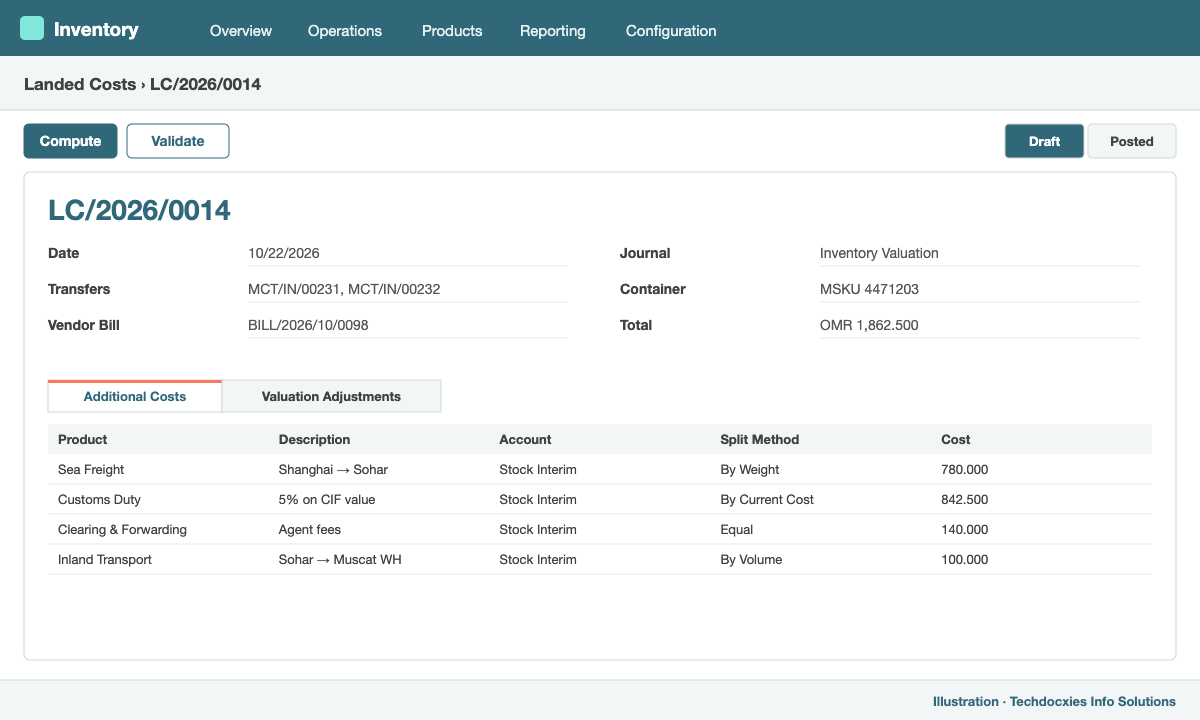
A landed cost record: charges allocated across a container receipt by weight and value
Odoo increases the stock value of the received items and posts the journal entry. For AVCO products, the new average cost includes the landed costs, so your pricelist formulas (Part 3) and margin reports reflect the true cost.
Step 5: Dropshipping for back-to-back trades
Many traders sell goods that ship directly from the supplier to the customer. Enable Dropshipping in Purchase settings and select the Dropship route on those products (or on individual sales order lines). Confirming the sales order then creates a purchase order to the vendor with the customer's delivery address. When the vendor ships, you validate the dropship transfer and Odoo invoices the customer — the goods never touch your warehouse but your margin is fully tracked.
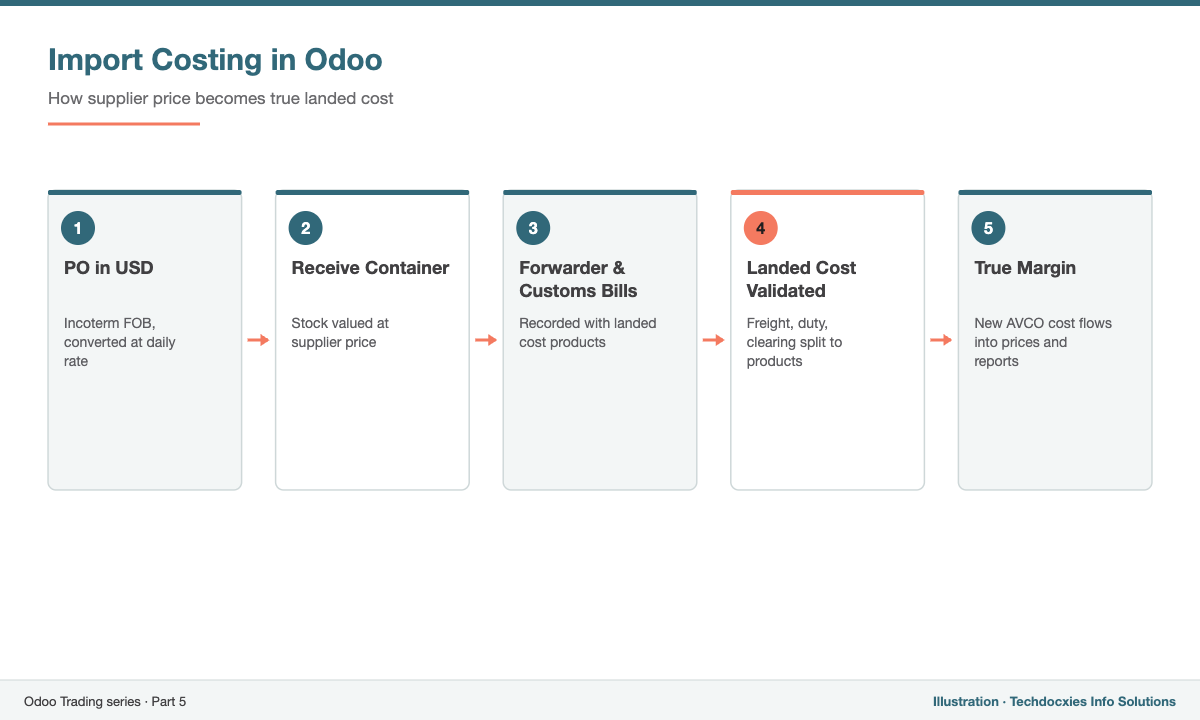
From foreign-currency PO to true landed cost
Wrapping up the trading series
Across these five parts we have covered the complete trading cycle in Odoo: product and valuation setup, purchasing, sales, warehouse operations and import costing. Configured together, they give you a single source of truth for stock, cost and margin.
Our Expertise
How Techdocxies Helps with Import & Export Trading in Odoo
Techdocxies Info Solutions has delivered 50+ Odoo projects for trading, distribution and service businesses across the GCC and beyond. We don't just switch modules on — we map your real processes first, then configure, customise, migrate, train and back you with 24/7 support.
- Landed cost design with your clearing agents, customs and freight forwarders
- Multi-currency, Incoterm and fiscal position setup for imports and exports
- Container and shipment tracking customisations linked to purchase orders
- Back-to-back and dropship workflows for project trading
- Margin and landed-cost analysis reports for management