
Contracting and fit-out companies across the GCC live and die by project margins. A villa fit-out, an MEP package or a road-works subcontract can look profitable at tender stage and quietly lose money by handover, because labour, materials and subcontractor costs sit in different spreadsheets and nobody sees the full picture until it's too late. With the right Odoo construction and Odoo contracting setup, Odoo 19 can bring estimating, contracts, site execution, procurement and progress billing into one system, with every dirham tagged to the project. Here's how to set it up, using an invented example company, Gulf Crest Contracting LLC, a Dubai fit-out contractor running 15 to 20 live projects.
Step 1: Switch on the right Odoo construction features
Start in Project › Configuration › Settings. For contracting work, enable Milestones (so you can bill by stage), Timesheets (so labour hours land on the project), Task Dependencies (so finishes can't be scheduled before MEP first fix), and Recurring Tasks for weekly safety inspections and site reports. Use project stages to follow each job from Tender through Mobilisation, Execution and Handover to Defects Liability.
Then go to Accounting › Configuration › Settings and confirm Analytic Accounting is active. Each project gets its own analytic account, and that account is what lets Odoo report true project profitability later.
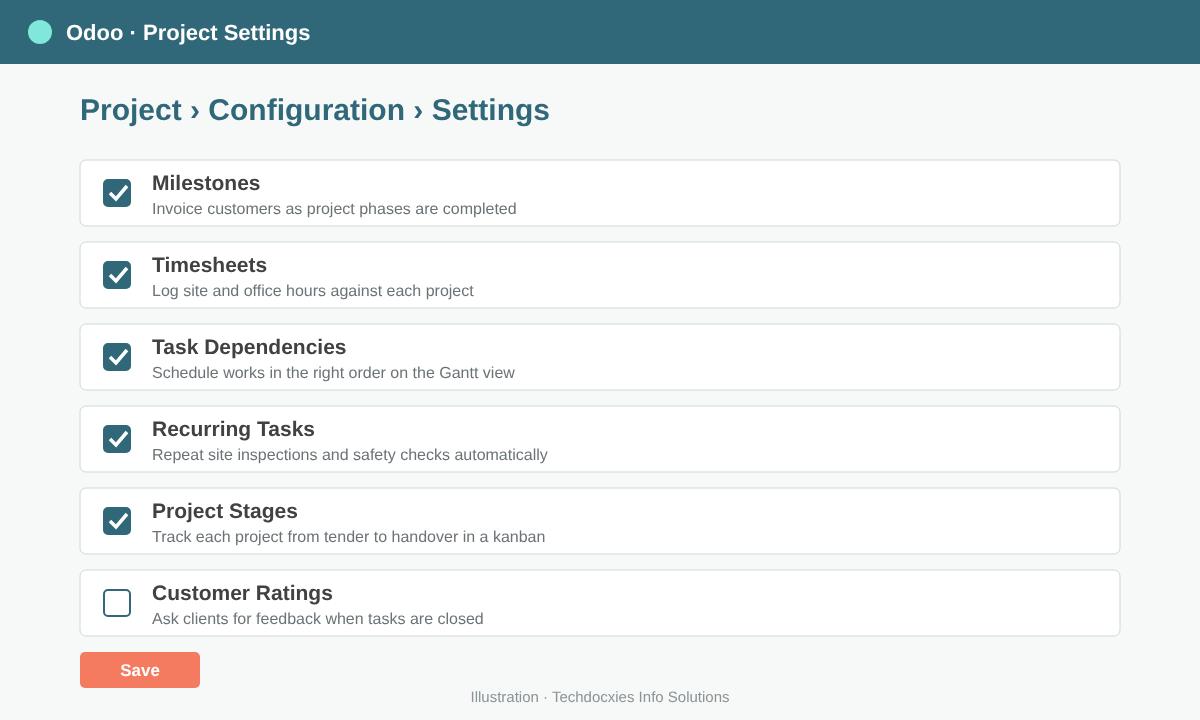
Project settings for a contracting company: milestones, timesheets, dependencies and recurring site checks.
Step 2: Build your Odoo contracting products and BOQ structure
In Sales › Products › Products, create service products for the way you bill. Gulf Crest uses one product per billing method:
- Lump-sum contract works: a service with invoicing policy Based on Milestones, set to create a project (or a task in a project template) when the order is confirmed.
- Variation orders: a separate service so approved variations are billed and reported apart from the original contract value.
- Daywork / labour hire: a service invoiced Based on Timesheets for time-and-material jobs.
Use sections and notes on the quotation to mirror your bill of quantities (Civil, MEP, Finishes, Joinery). For large tenders, many contractors keep the detailed BOQ in a spreadsheet and import summary lines. That's fine as long as the contract value in Odoo matches the signed contract.
Step 3: Confirm the contract and set up milestone billing
When the client signs, confirm the quotation in Sales › Orders › Quotations. Odoo creates the project automatically from the product's settings. Open the project and define milestones that match the payment schedule in the contract, each linked to the sales order line with its share of the value.
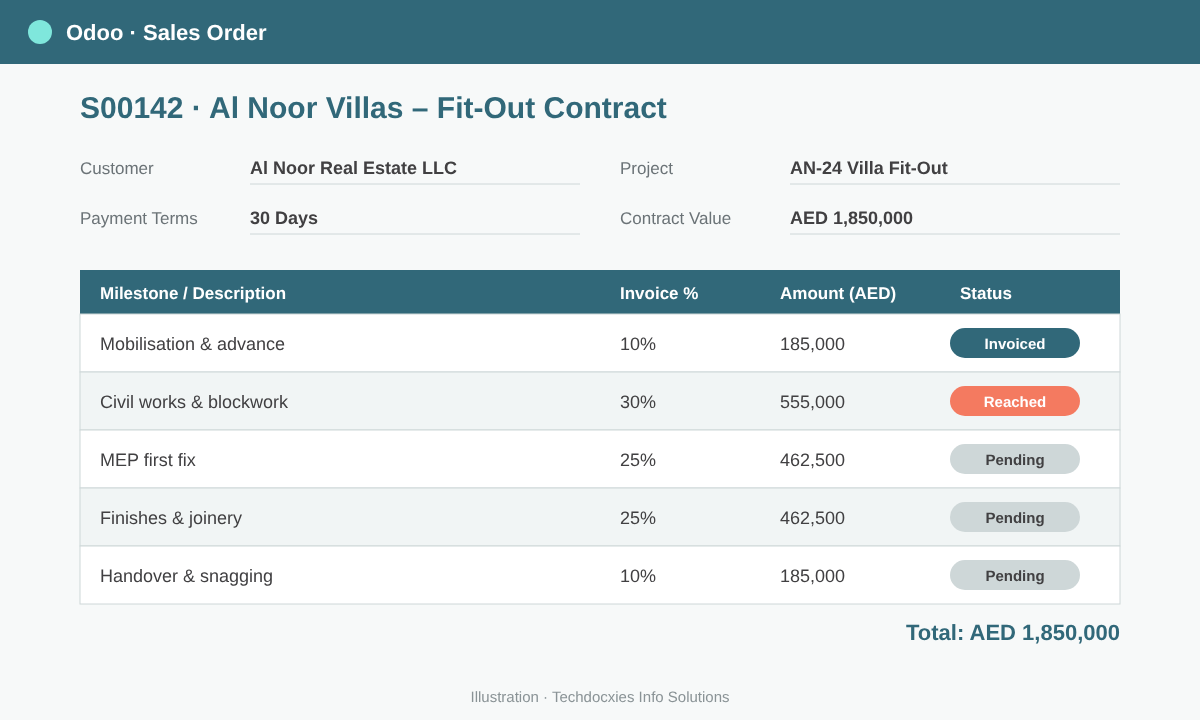
A fit-out contract split into five billing milestones, each invoiced once it's marked as reached.
When the site engineer confirms a stage is complete (ideally after the consultant signs the progress certificate), the project manager marks the milestone as reached. Accounts can then create the invoice straight from the sales order, and only reached milestones get billed.
Pro tip: Build one project template per job type (villa fit-out, office fit-out, MEP package) with standard task lists, stages and milestones already in place. New projects then start in minutes and every PM works the same way, which makes portfolio reporting far more reliable.
Step 4: Plan the work and capture site labour
Break each project into tasks by trade or zone, assign foremen and set deadlines. The Gantt view in Project shows dependencies so delays show up early. Site supervisors log crew hours against tasks in Timesheets, from the mobile app if needed. Each employee's hourly cost then flows into the project's costs automatically.
Step 5: Procure materials and subcontractors against the project
Every purchase order line should carry the project's analytic distribution. In Purchase › Configuration › Settings, enable Purchase Agreements to set up blanket orders with regular suppliers (blockwork, gypsum, cabling) at agreed rates, and to manage subcontract packages. Materials can go into a dedicated site location in Inventory, or be delivered directly to site with a dropship route, so stock issued to a project is recorded rather than lost.
Use this checklist before any purchase is approved:
| Check | Why it matters |
|---|---|
| Analytic distribution set to the project | Cost shows up in project profitability |
| Price matches the agreement or quotation | Stops rate creep on long jobs |
| Delivery address is the site or site location | Avoids double handling through the main store |
| Vendor bill matched to the PO and receipt | Prevents paying for undelivered materials |
| Subcontractor retention terms recorded | Ensures you hold back what the contract allows |
Step 6: Handle retention and progress billing
GCC contracts typically retain 5–10% of each payment until handover or the end of the defects liability period. Odoo doesn't have a dedicated retention module out of the box, so most contractors handle it in one of two ways. Some use a payment term with two instalments, such as 90% due in 30 days and 10% due after 365 days. Others add a separate negative retention line on each progress invoice, posted to a retention receivable account. Pick one method and apply it to every project.
Watch out: Don't mark a milestone as reached just because the work looks done on site. Wait for the client's or consultant's certified progress payment. Invoicing ahead of certification inflates receivables, leads to rejected invoices and VAT credit notes, and distorts your project margins.
Step 7: Review job costing and project profitability every month
Open any project and use its profitability panel to compare invoiced and to-invoice revenue against costs: timesheets, vendor bills, expenses and materials. Group projects by manager or stage in the list view to find jobs going over budget. Set a budget on each project's analytic account and run a monthly review of budget against actual with each PM.
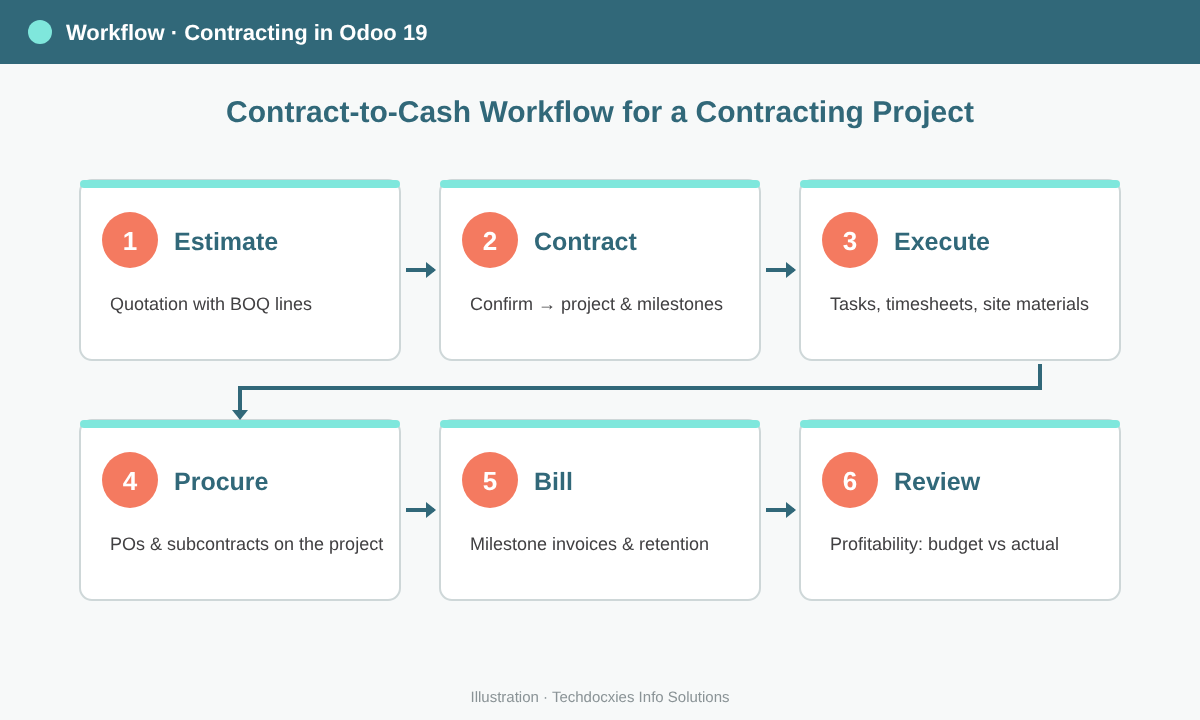
The contract-to-cash flow: estimate, contract, execute, procure, bill and review, all on one project record.
OUR EXPERTISE
How Techdocxies Helps with Odoo for Contracting & Construction
Techdocxies Info Solutions has delivered 50+ Odoo projects for trading, distribution and service businesses across the GCC and beyond. We don't just switch modules on — we map your real processes first, then configure, customise, migrate, train and back you with 24/7 support.
- Project templates, stages and milestones designed around your contract types and payment schedules
- Retention, advance recovery and progress-billing setup that fits GCC contract terms and VAT rules
- Analytic accounting and budgets so every project shows its real margin
- Subcontractor agreements, site stores and purchase approval workflows
- Mobile timesheets and site reporting for foremen and engineers, with training for your teams