
For most GCC trading and service companies, vehicles are the second-biggest overhead after salaries. Delivery vans, sales pickups, executive cars and leased trucks all carry lease instalments, insurance, registration renewals, fuel, tolls, fines and repairs — and these costs usually sit in spreadsheets, WhatsApp threads and scattered vendor bills. Odoo 19 Fleet brings every vehicle, driver, contract and service into one place, linked to accounting and HR, so you finally know what each vehicle really costs you per month and per kilometre.
In this guide we walk through a practical Fleet setup using an invented company, Sahara Gulf Distribution LLC, a Dubai-based FMCG distributor running 42 vehicles across Dubai, Sharjah and Abu Dhabi.
Step 1: Install Fleet and configure the basics
Install the Fleet app from Apps. Then open Fleet › Configuration › Settings. Two settings matter from day one:
- End Date Contract Alert — the number of days before a contract expires that the fleet manager is notified. Sahara Gulf uses 30 days, enough time to renegotiate a lease or renew insurance.
- New Vehicle Request — a limit on new-car requests for a model when spare vehicles are available, which stops employees requesting new cars while suitable ones sit idle.
Next, assign a Fleet Manager per vehicle (or per group of vehicles). Fleet managers receive the contract alerts and own the service schedule.
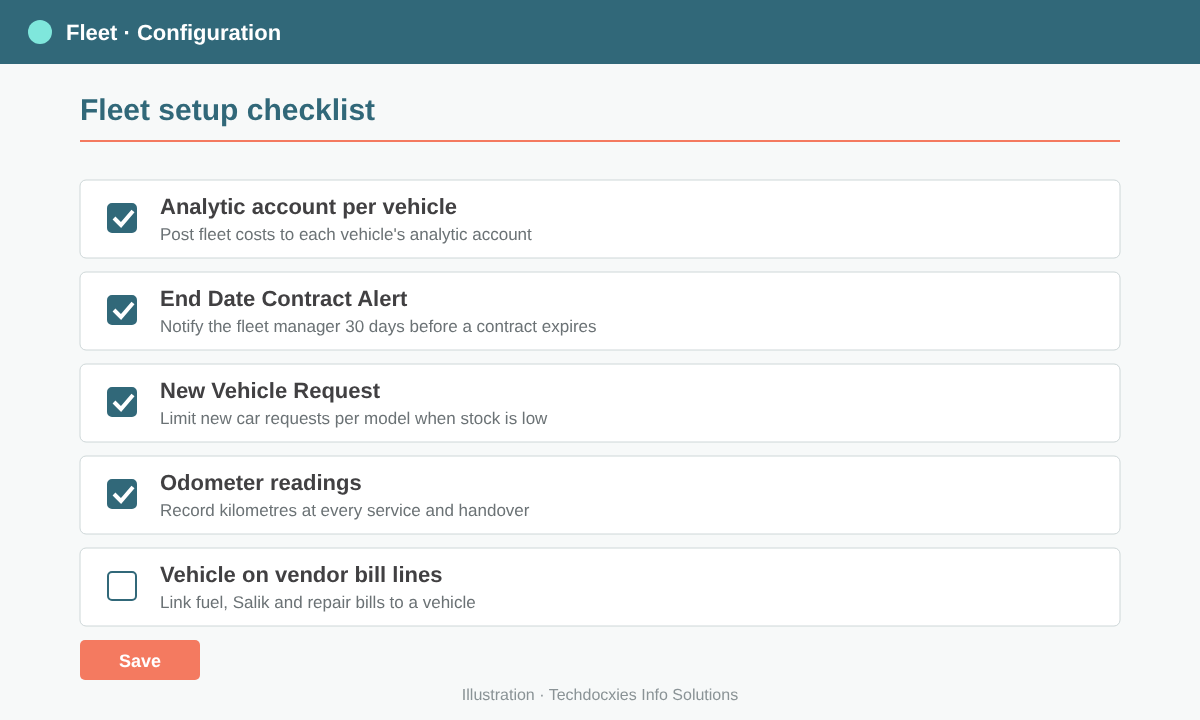
A simple fleet configuration checklist: alerts, request limits, analytic accounts and vehicle-linked bills.
Step 2: Set up manufacturers, models and categories
Go to Fleet › Configuration › Manufacturers and Fleet › Configuration › Models. Create each model once — for example Toyota Hiace, Toyota Hilux, Isuzu NPR — with defaults such as vehicle type, fuel type, seats and default CO₂. Every vehicle you register on that model inherits these details.
Use Categories (e.g. Light Commercial, Heavy Truck, Executive Car) and Tags (e.g. Sales Van, Cold Chain, Pool Car) so reports can be grouped the way your operations team thinks.
Step 3: Register vehicles and assign drivers
Open Fleet › Fleet › Vehicles and create each vehicle with its licence plate, model, chassis number, first registration date, catalogue value and current odometer. In Odoo, drivers are contacts, so you can assign an employee's private or work contact as Driver, and plan a handover with Future Driver and the Assignment Date. Odoo keeps a driver history on the vehicle — useful when a traffic fine arrives three weeks after the fact.
Use the vehicle stages (New Request, To Order, Registered, Downgraded) as a simple pipeline from request to disposal, and archive vehicles once they are sold.
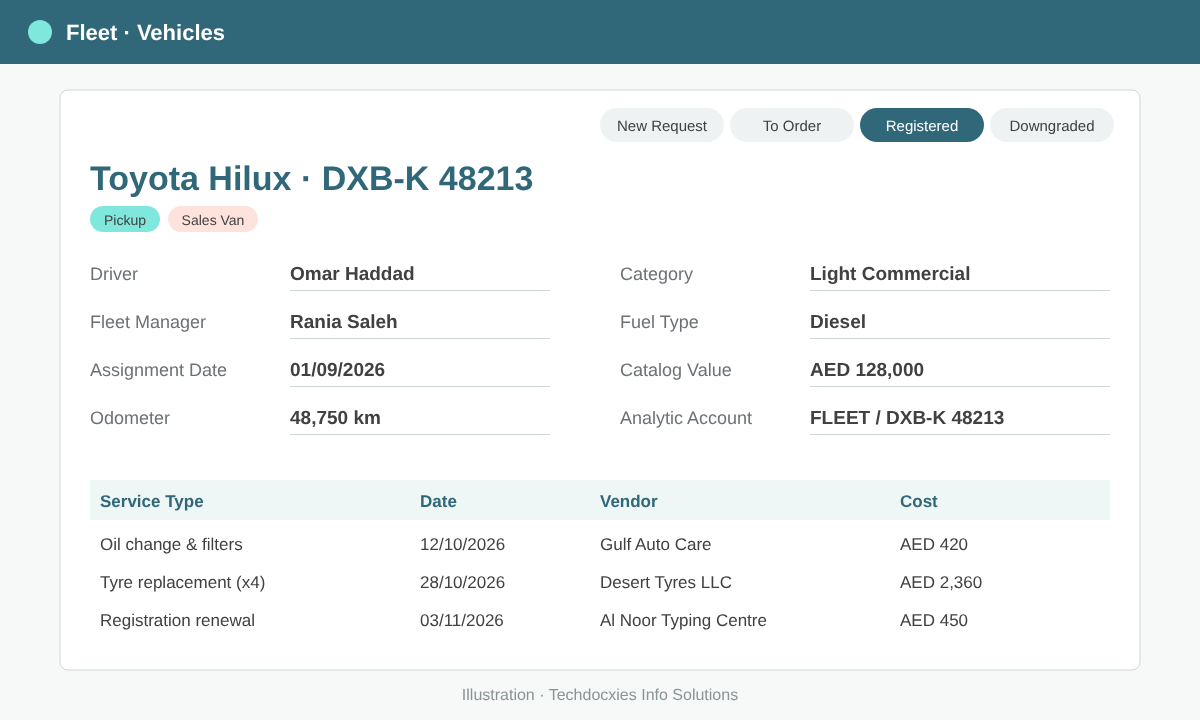
A registered vehicle with driver, fleet manager, odometer, analytic account and its service history.
Pro tip: Create one analytic account per vehicle (or per vehicle group such as "Sharjah route vans") and set it on the vehicle. Fuel, toll and repair bills posted against that vehicle then flow into analytic reporting, so management can see vehicle cost by branch, route or cost centre — not just as one "Motor Vehicle Expenses" line in the P&L.
Step 4: Record leases, insurance and other contracts
Under Fleet › Fleet › Contracts, create a contract for every lease, insurance policy and maintenance agreement. Enter the vendor, start and expiration dates, activation cost and the recurring cost with its frequency (monthly, yearly, etc.). Odoo tracks the contract state and, combined with the alert set in Step 1, warns the fleet manager before expiry.
Sahara Gulf leases 30 vans on 36-month contracts at AED 2,450 per month each and insures all 42 vehicles annually — all visible in one list, filtered by "expiring soon".
Step 5: Log services, repairs and odometer readings
Define your Service Types under Fleet › Configuration › Service Types — oil change, tyre replacement, registration renewal, accident repair, Salik/toll top-up and so on. Then log each job in Fleet › Fleet › Services with the date, vendor, cost, odometer and status.
Record odometer readings at every service and driver handover (Fleet › Fleet › Odometers). Accurate kilometres are what turn raw costs into a meaningful cost-per-km figure.
Watch out: Fleet services and contracts record costs for tracking, but they don't automatically replace your accounting entries. Decide upfront where the financial truth lives — normally the vendor bill in Accounting, with the vehicle set on the bill line — and avoid entering the same fuel or repair cost twice, once as a bill and again manually as a service.
Step 6: Connect vendor bills to vehicles
With Fleet and Accounting installed together, vendor bill lines can carry a Vehicle reference. When the accounts team posts a fuel card statement or garage invoice in Accounting › Vendors › Bills, they select the vehicle on each line. The cost then appears on the vehicle itself, and VAT is handled normally on the bill — so your fleet reports and your books always agree.
Step 7: Analyse fleet costs
Use Fleet › Reporting to analyse costs by vehicle, model, category, driver or period in pivot and graph views. Combine this with analytic reports in Accounting to compare branches. Sahara Gulf discovered that four older Hiace vans cost 38% more per km than the fleet average — clear evidence for replacing them at the next lease cycle.
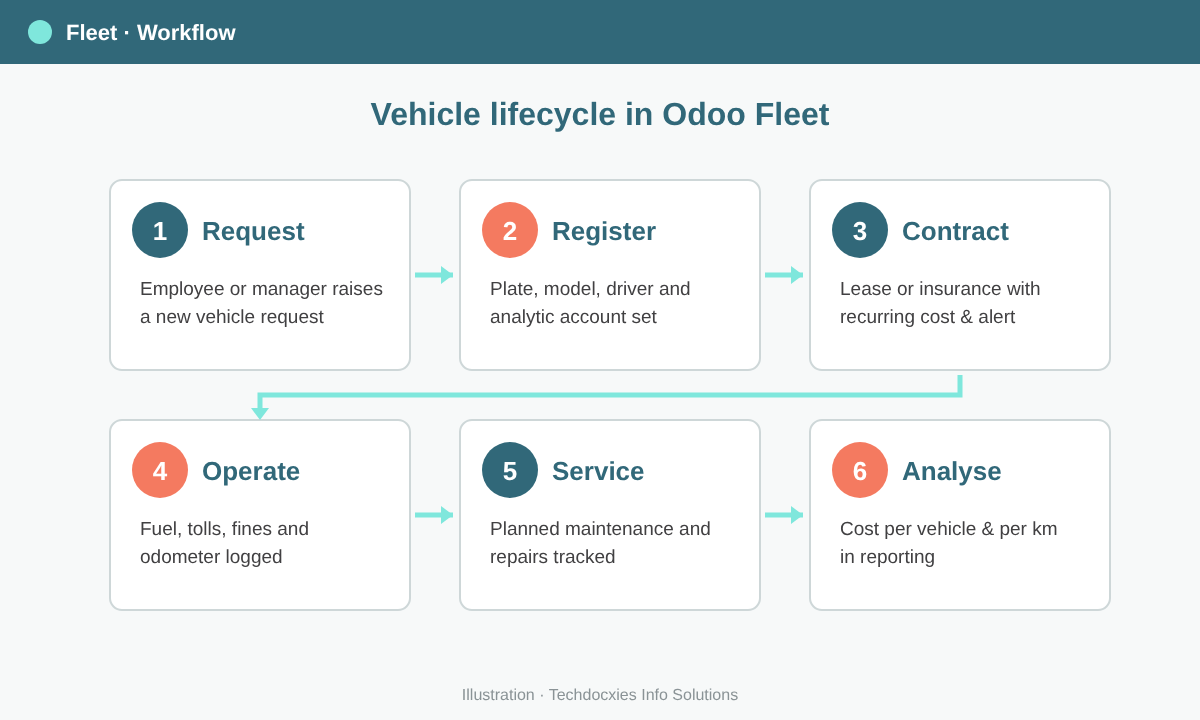
The full vehicle lifecycle in Odoo Fleet, from request to cost analysis.
Fleet go-live checklist
| Area | What to prepare | Owner |
|---|---|---|
| Master data | Manufacturers, models, categories, tags | Fleet manager |
| Vehicles | Plates, chassis numbers, registration dates, current odometer | Fleet manager |
| Drivers | Driver contacts linked to employees; licence expiry tracked | HR |
| Contracts | Leases, insurance, maintenance agreements with recurring costs | Procurement |
| Accounting | Analytic accounts per vehicle; vehicle field used on bill lines | Finance |
| Services | Service types and the last service date per vehicle | Workshop / admin |
| Reporting | Agreed KPIs: cost per vehicle, cost per km, contracts expiring | Management |
Start with clean vehicle and contract data, enforce the "vehicle on every bill line" rule from week one, and within a month you'll have the cost visibility most fleets never get from spreadsheets.
OUR EXPERTISE
How Techdocxies Helps with Odoo Fleet Management
Techdocxies Info Solutions has delivered 50+ Odoo projects for trading, distribution and service businesses across the GCC and beyond. We don't just switch modules on — we map your real processes first, then configure, customise, migrate, train and back you with 24/7 support.
- Fleet master data migration — vehicles, drivers, odometers and contract history from spreadsheets
- Lease, insurance and registration contracts set up with renewal alerts
- Analytic accounting per vehicle, route or branch, linked to vendor bills
- Integration of fuel card, toll and traffic-fine data into Odoo
- Cost-per-km and fleet utilisation dashboards for management