
A customer pays AED 36,000 in January for a twelve-month support plan. Your bank balance goes up that day, but only AED 3,000 of it has been earned. The same thing happens the other way when you prepay a year of office rent or insurance. Book those amounts straight to the P&L and your monthly results swing up and down for no business reason, and your VAT, tax and management reports stop agreeing with each other. Odoo 19 handles this with start and end dates on invoice and bill lines. This guide follows Gulf Spark IT Services, an invented Dubai managed-services company, as it sets up deferred revenue and deferred expenses and builds them into its month-end close.
Step 1: Create the deferral accounts
Deferred revenue is a liability: money received for work you still owe. Deferred (prepaid) expenses are an asset: costs paid for periods that haven't happened yet. Check your chart of accounts under Accounting › Configuration › Chart of Accounts. Most GCC localisations already include suitable accounts. If yours doesn't, create two:
- Unearned Revenue as a Current Liabilities account (Gulf Spark uses 2450)
- Prepaid Expenses as a Current Assets account (Gulf Spark uses 1450)
If the auditors want deferrals over twelve months shown separately, add non-current versions too and move the long-term part at year end.
Step 2: Configure deferral settings
Go to Accounting › Configuration › Settings and scroll to the deferred expenses and revenues section. Choose the journal for the recognition entries (usually Miscellaneous Operations), the deferred expense account and the deferred revenue account. Then make two decisions:
- Generate entries: On invoice/bill validation creates every recognition entry the moment the document is posted. Manually & Grouped lets you generate one combined entry per period from the deferral report, which keeps the journal tidy when you have hundreds of subscriptions.
- Amount computation: spread the amount by days, by months, or by full months. Day-based gives exact figures for contracts that start mid-month. Month-based gives round numbers that are easier to check.
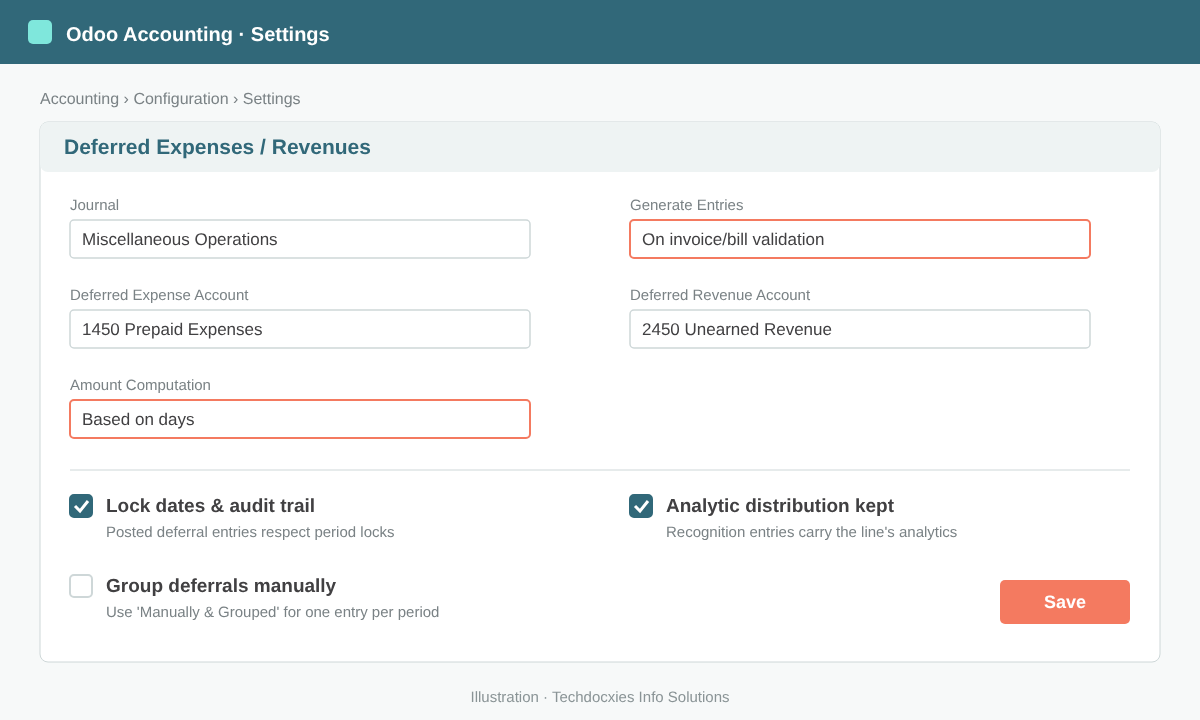
Deferral settings: journal, accounts, generation mode and computation method
Step 3: Add start and end dates on invoice lines
Open a customer invoice under Accounting › Customers › Invoices. On the invoice lines, use the optional-columns toggle at the right of the line header to show Start Date and End Date. Fill both on every line that covers a service period. Leave them empty on one-off items such as an onboarding workshop, which is earned on delivery.
When Gulf Spark posts INV/2026/00418 for its client Al Noor Hospitality, the AED 36,000 support plan and the AED 7,200 backup subscription go to Unearned Revenue. Odoo then creates the entries that move one share into income each month. The customer still sees a normal invoice, and VAT is charged in full on the invoice date, as GCC VAT rules expect for advance billing.
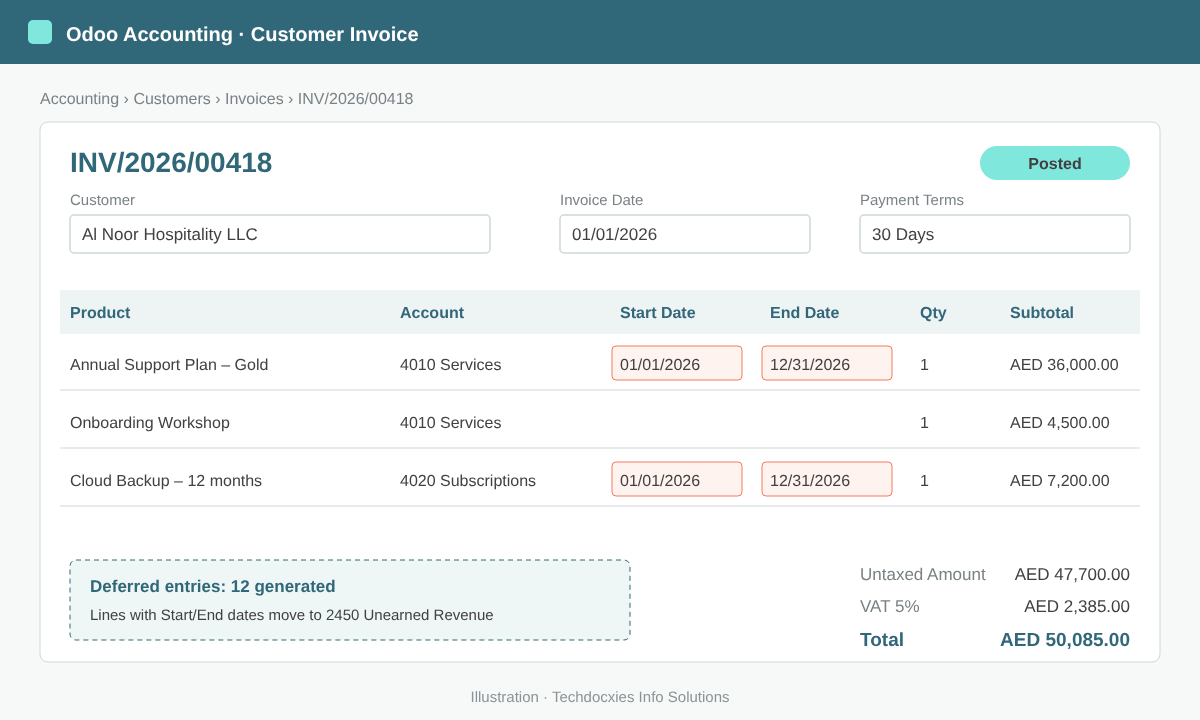
Invoice lines with start and end dates are deferred automatically on posting
Pro tip: Selling subscriptions through Odoo Sales or Subscriptions? Make sure the service period carries through to the invoice lines, so dates are never typed by hand. For contracts invoiced from a spreadsheet, include start and end date columns in your import file. Every deferral is then created at import with no manual step.
Step 4: Defer vendor bills the same way
Prepaid costs work the same way under Accounting › Vendors › Bills. Gulf Spark pays AED 120,000 annual rent for its Business Bay office in advance and AED 18,000 for a year of professional indemnity insurance. With start and end dates on those bill lines, Odoo parks the cost in Prepaid Expenses and charges AED 10,000 and AED 1,500 to the P&L each month. If the bill line has an analytic distribution (a department or project, say), the recognition entries keep it. That way cost-centre reports show the monthly charge, not one big hit in the month the bill arrived.
Step 5: Review the deferral reports at month end
Under Accounting › Reporting, open the Deferred Revenue and Deferred Expense reports. Each shows, per account and period, the total amount, what has been recognised before the period, what is recognised in the period and what is left for later. If you chose Manually & Grouped, this is also where you generate the period's recognition entry. The closing balance on each report should match the balance of the deferral account on the balance sheet, and this is the key reconciliation for the close.
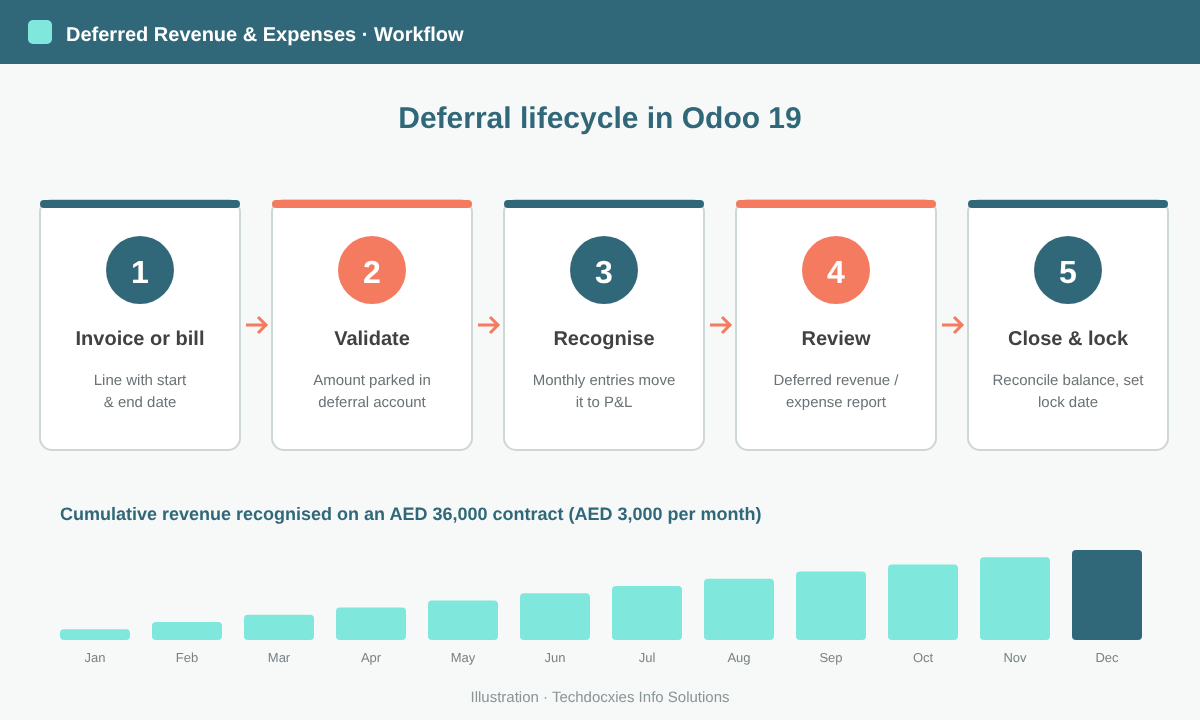
The deferral lifecycle, from document to locked period
Watch out: Changing the dates or amount on a posted document means resetting it to draft, and Odoo then reverses and recreates its deferral entries. If a past period is already locked, that can fail or land in the wrong month. When a contract is cancelled or extended part-way through, issue a credit note and a new invoice rather than editing the original. Agree the approach with your auditor before go-live.
Step 6: Migrate existing deferrals and lock the period
Most companies go live with contracts already running. For each one, work out the balance not yet recognised on the cut-over date. Then post a journal entry for it, with lines dated across the remaining service period, or recreate the contract as an opening invoice line with the original dates. Once each month is reconciled, set the lock date under Accounting › Accounting › Lock Dates (or in the accounting settings, depending on your version), so nobody can post into a closed period.
Month-end deferral checklist
| Check | Where in Odoo | Owner |
|---|---|---|
| All period-based lines have start and end dates | Invoices / Bills list, grouped by account | Billing team |
| Grouped recognition entry generated (if manual mode) | Accounting › Reporting › Deferred Revenue / Expense | Accountant |
| Report balance = deferral account balance | Balance Sheet vs deferral reports | Accountant |
| Cancelled or extended contracts handled with credit notes | Customers › Credit Notes | Finance manager |
| Non-current part moved at year end | Miscellaneous journal entry | Finance manager |
| Period locked | Lock Dates | CFO |
With deferrals in place, Gulf Spark's monthly P&L shows the revenue it actually earned and the costs it actually used. The balance sheet shows what it still owes customers and what it has paid in advance. It is a small setup, and it removes one of the most common reasons management accounts and audited accounts disagree.
OUR EXPERTISE
How Techdocxies Helps with Deferred Revenue & Expenses
Techdocxies Info Solutions has delivered 50+ Odoo projects for trading, distribution and service businesses across the GCC and beyond. We don't just switch modules on — we map your real processes first, then configure, customise, migrate, train and back you with 24/7 support.
- Design the deferral accounts, journals and computation method to match your revenue recognition policy
- Connect Sales and Subscriptions so service periods flow onto invoice lines automatically
- Migrate running contracts and prepayments with correct remaining balances at go-live
- Set up month-end deferral reconciliation, analytic reporting and lock-date controls
- Train your finance team on credit notes, contract changes and audit-ready deferral reports