
A customer says they owe you OMR 11,000. Your books show OMR 12,600. A supplier chases you for a bill your team has never seen. Most GCC trading and service businesses run into these arguments every month, and they cost time, cash and goodwill. In Odoo 19 you can keep statements straightforward: clean ledgers, regular reconciliation, a Partner Ledger PDF your customer can check line by line, and a set routine for agreeing supplier balances. This guide walks through the setup and the month-end routine.
Step 1: Get the Foundations Right Before You Send Anything
A statement is only as reliable as the ledger behind it. Before sending your first batch, check the basics in Accounting › Configuration › Settings and on each contact:
- Receivable and payable accounts: every customer and vendor should post to the right control account (set on the contact's Accounting tab). If customers are split across several receivable accounts, the statement will be incomplete.
- Payment terms: configure them under Accounting › Configuration › Payment Terms (for example 30 or 60 days end of month), so due dates and ageing come out right.
- Company structure: for a group, keep branches as child contacts of one parent company. Odoo then collects the branches' invoices on the commercial entity, giving you one statement per legal customer.
- Statement email address: add an Invoice address contact for each customer's accounts team so statements reach the finance office, not the buyer.
Step 2: Reconcile Payments Before Month-End
Unreconciled payments are the main reason statements look wrong. When a payment sits on the account without being matched to invoices, the closing balance is correct but the customer cannot see which invoices are settled. Work through Accounting › Accounting › Bank (or the bank journal on the dashboard) and match every receipt to its invoices. Credit notes should be reconciled against the invoices they reduce.
Step 3: Review Ageing to Decide Who Gets What
Open Accounting › Reporting › Aged Receivable and sort by the older buckets (61–90 and 90+ days). This tells you which customers need a statement plus a phone call, and which only need the routine monthly email. For suppliers, Accounting › Reporting › Aged Payable shows what you owe by due date. Use it to agree on priorities with treasury before suppliers start chasing.
Step 4: Produce the Customer Statement from the Partner Ledger
The Partner Ledger is the standard statement in Odoo 19. Go to Accounting › Reporting › Partner Ledger, set the date range (for example, the start of the financial year to the last day of the month), filter on the receivable account type, then select the customer.
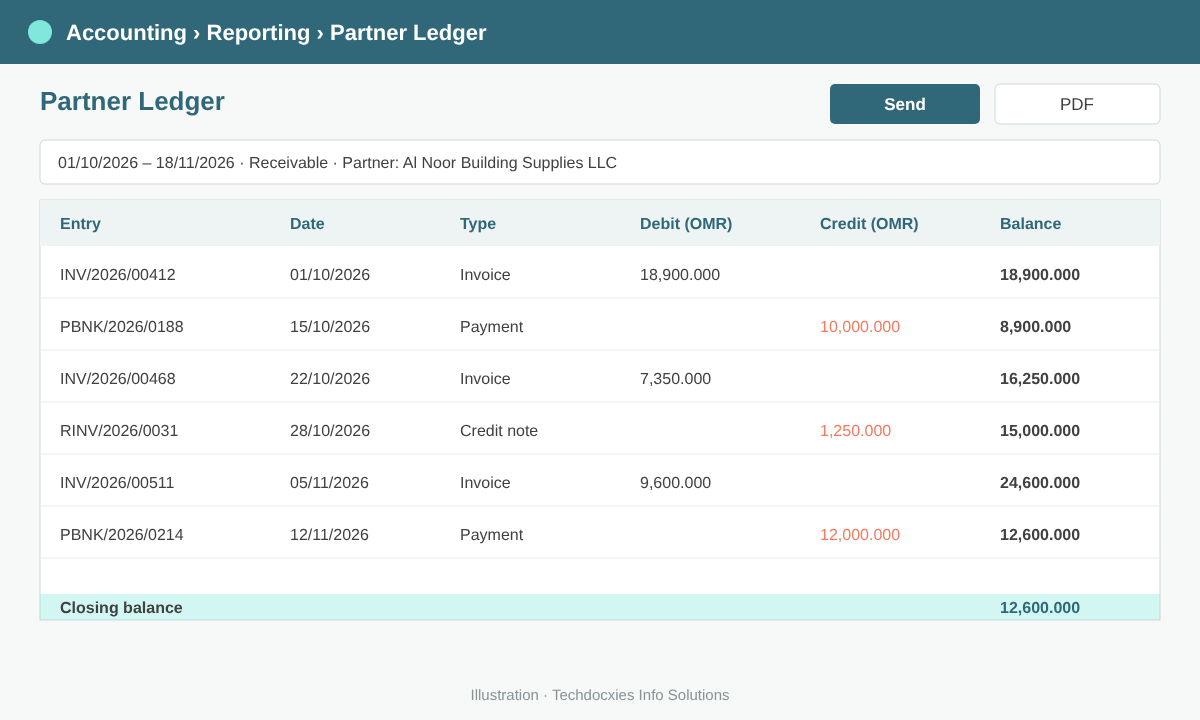
The Partner Ledger shows every invoice, payment and credit note with a running balance: the statement your customer sees.
Expand the partner to show each invoice, payment and credit note with a running balance, then export to PDF (or XLSX for customers who want to match it in a spreadsheet). Send it from the customer's record so a copy is logged in the chatter. That gives your team a dated record of what was sent and when. For customers with overdue amounts, Odoo's payment follow-up feature can send a reminder that lists the open invoices, so routine chasing becomes part of the same routine.
Step 5: Reconcile Vendor Statements Against Your Books
Supplier statements run the other way: the vendor sends theirs, and you check it against yours. Run the Partner Ledger again, filtered on the payable account and the vendor, and compare it line by line with the supplier's PDF.
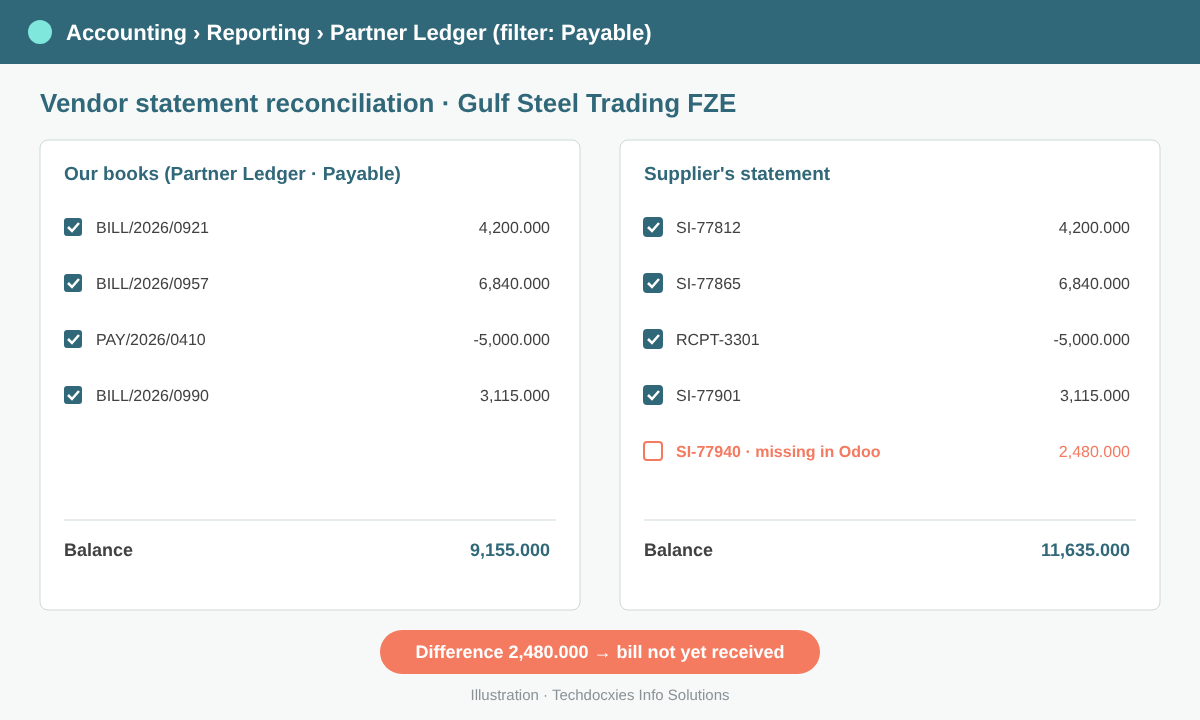
Comparing your payable ledger with the supplier's statement shows the gap straight away. Here it is a bill that never reached accounts.
The differences usually fall into a few groups:
| Difference | Typical cause | Action in Odoo |
|---|---|---|
| Invoice on supplier statement, not in Odoo | Bill lost, unapproved or sitting in a mailbox | Find it and record the vendor bill, or ask for a copy |
| Payment in Odoo, not on supplier statement | Timing: paid near month-end | No entry; note it as a reconciling item |
| Amount mismatch | Price, quantity or VAT difference | Ask for a credit note or raise a refund on the bill |
| Debit note not applied | Return or rebate you claimed but the supplier hasn't recorded | Send the credit note reference to the supplier |
| Duplicate bill | The same invoice entered twice | Reverse the duplicate with a credit note |
Step 6: Build a Monthly Statement Routine
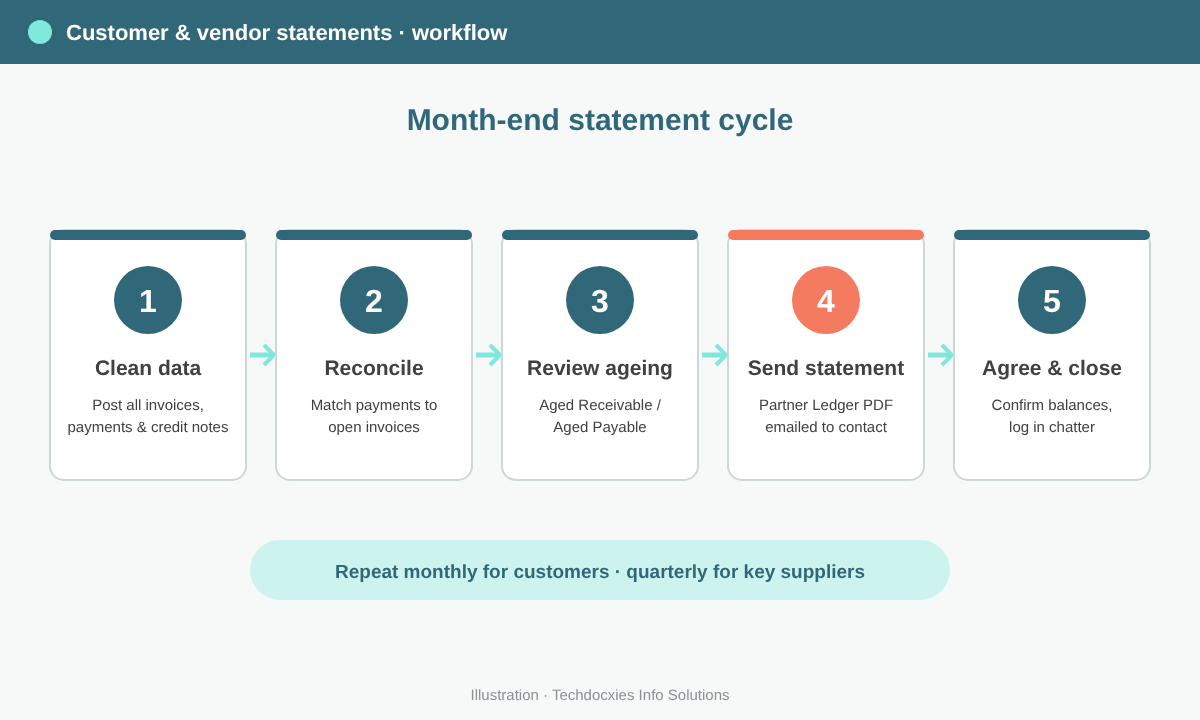
A five-step month-end routine keeps customer and supplier balances agreed.
Statements work best when they go out on a schedule. Use this checklist each month:
- ☐ All sales invoices, vendor bills and credit notes for the month posted
- ☐ Bank statements imported and every receipt and payment reconciled
- ☐ Aged Receivable reviewed; customers over 60 days flagged for a call
- ☐ Partner Ledger statements sent to customers by the 5th working day
- ☐ Statements from top suppliers reconciled at least quarterly
- ☐ Customer disputes logged as chatter notes or activities with an owner and due date
- ☐ Balance confirmations requested from key partners before year-end audit
At Al Noor Building Supplies, a fictional Muscat distributor with 400 active credit customers, moving to this routine cut statement-related calls by more than half within one quarter. Customers stopped disputing balances once they could see each payment matched against its invoice.
OUR EXPERTISE
How Techdocxies Helps with Customer & Vendor Statements
Techdocxies Info Solutions has delivered 50+ Odoo projects for trading, distribution and service businesses across the GCC and beyond. We don't just switch modules on — we map your real processes first, then configure, customise, migrate, train and back you with 24/7 support.
- Cleaning up migrated opening balances so your first Odoo statements are correct
- Reconciliation models that auto-match customer receipts to invoices
- Branded statement layouts with bilingual (English/Arabic) headers
- Scheduled statement and payment follow-up runs for large customer bases
- Training finance teams on vendor statement reconciliation and month-end close