
Profitable companies still run out of cash. A distributor can post a healthy margin in December and still struggle to pay suppliers in January because three large customers paid late while a container of stock landed on 30-day terms. Odoo 19 already holds most of what you need to see that gap coming: invoice due dates, unpaid bills, confirmed orders and reconciled bank balances. This guide shows how an invented UAE distributor, Sahara Line Distribution, turns that data into a rolling 13-week cash-flow forecast that it reviews every Monday.
Step 1: Get due dates right with payment terms
A forecast is only as good as the due dates behind it. If every customer is on "Immediate Payment" in Odoo but actually pays in 60 days, your projected receipts will be wrong from the first week. Open Accounting › Configuration › Payment Terms and create terms that match your real contracts, including instalment terms such as 30% advance, 40% after 30 days and the balance at 60 days end of month. Odoo splits each invoice into one receivable line per instalment, each with its own due date.
Then set the default terms on each customer and vendor (the Sales & Purchase tab of the contact) so invoices and bills pick them up automatically. Review the ten largest customers first; they usually drive most of the forecast.
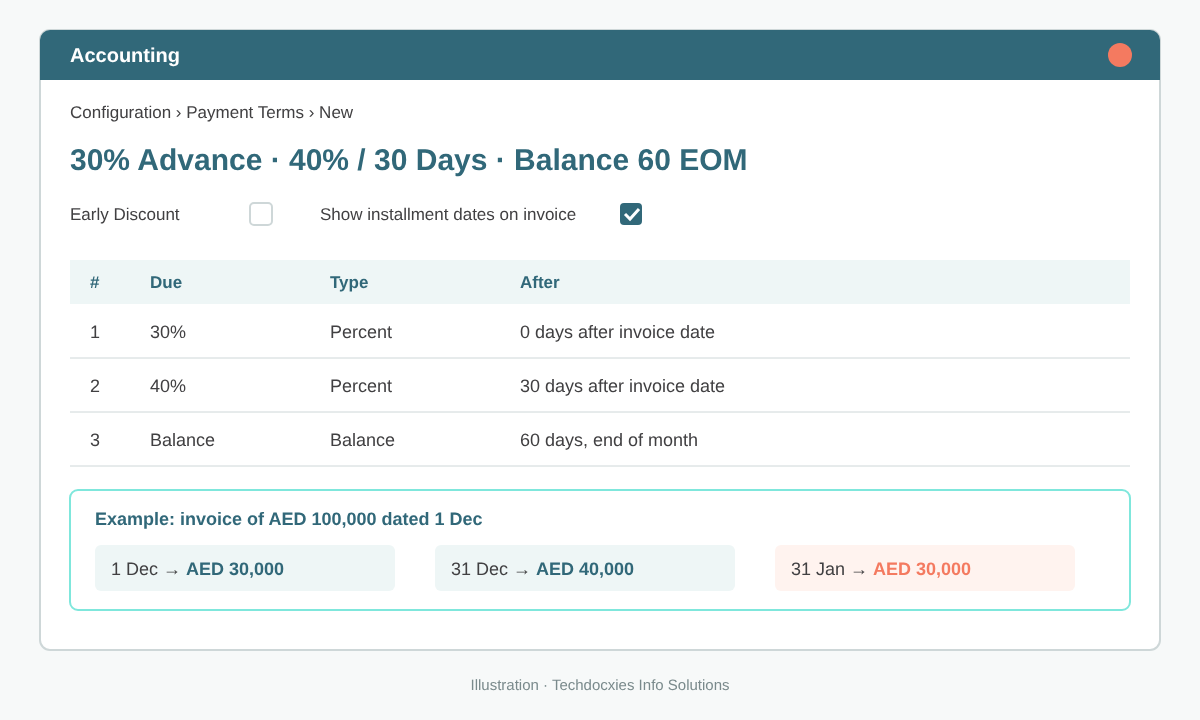
An instalment payment term splits one invoice into three dated receivables, so each shows up in the right forecast week.
Step 2: Start from a reconciled bank balance
Your opening cash position is the reconciled balance of every bank and cash journal, not the figure on the general ledger before reconciliation. Connect bank feeds or import statements, then clear the reconciliation queue from the bank journal cards on the Accounting dashboard. Do the same for petty cash and any foreign-currency accounts. Sahara Line keeps AED, USD and SAR accounts and converts all three to AED at the current rate in its forecast.
Step 3: List receivables and payables by due date
For a quick overview, use the Aged Receivable and Aged Payable reports under Accounting › Reporting. For forecasting, a list of open items by week is more useful. Go to Accounting › Accounting › Journal Items, filter on unpaid items in receivable accounts, and group by due date by week. Repeat with payable accounts for vendor bills.
Where your collections team knows a customer will pay late, note the expected payment date during follow-up so the forecast uses the realistic date rather than the contractual one. Sahara Line's credit controller updates these dates after every collection call.
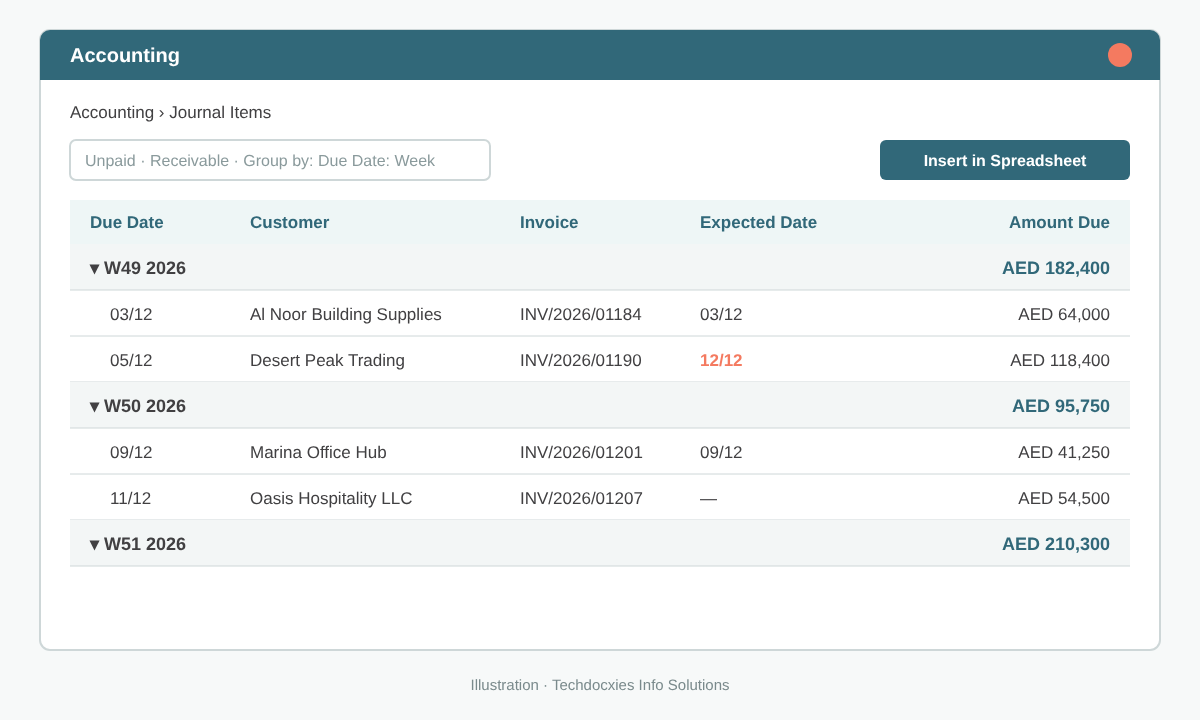
Open receivables grouped by week, with an expected date flagged where a customer has said it will pay later than agreed.
Step 4: Add committed orders that are not yet invoiced
Invoices and bills only cover the near term. Confirmed orders tell you what is coming next. Under Sales › To Invoice › Orders to Invoice you will find confirmed sales orders waiting to be invoiced; add their expected delivery date plus the customer's payment term to estimate when cash arrives. In Purchase › Orders › Purchase Orders, filter on orders still waiting for bills to see supplier commitments, including the import shipments that hit your cash hardest. Add landed costs such as freight, customs duty and clearing charges as separate lines.
Step 5: Add fixed and statutory outflows
Some of the largest payments never pass through a sales or purchase order. List them once and roll them forward each week:
- Payroll and WPS salary transfers, including expected overtime
- Rent, utilities, insurance and software subscriptions
- Loan instalments, trade finance repayments and bank charges
- VAT payments on your filing dates, and corporate tax instalments where applicable
- End-of-service gratuity for leavers you already know about
Watch out: Post-dated cheques are common across the GCC and are easy to double-count. If you have already recorded a received PDC as a payment, the invoice no longer shows as open, so add the cheque to the forecast on its maturity date instead. Agree one rule with your team and apply it consistently, or the forecast will drift away from the bank.
Step 6: Build the 13-week sheet in Odoo Spreadsheet
From the journal items list or a pivot view, use Insert in Spreadsheet (available with Odoo Enterprise and Documents) to place the data in an Odoo spreadsheet. The figures stay linked to the database and refresh when you reopen the sheet, so you do not have to export and paste every week. Add your committed orders and fixed outflows as further sections, then sum each week.
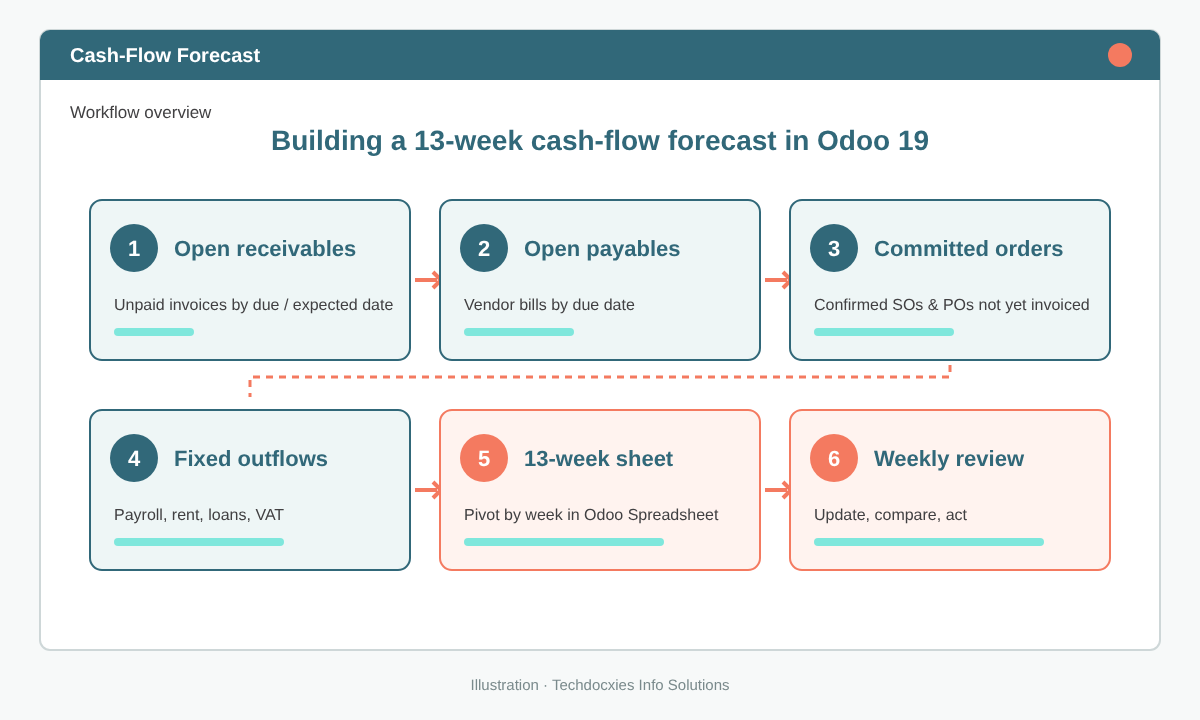
The forecast combines four data sources into one weekly sheet, which the finance team reviews every week.
A simple layout that works for most trading and service businesses:
| Row | Source in Odoo | Updated |
|---|---|---|
| Opening cash | Reconciled bank and cash journals | Every Monday |
| Customer receipts | Open receivables by due or expected date | Live link |
| Receipts from orders not yet invoiced | Sales orders to invoice + payment terms | Live link |
| Supplier payments | Open payables by due date | Live link |
| Committed purchases and landed costs | Purchase orders waiting for bills | Live link |
| Payroll, rent, loans, VAT | Manual schedule maintained by finance | Monthly |
| Closing cash and minimum balance check | Calculated | Automatic |
Pro tip: Add a minimum cash line, for example two weeks of payroll plus rent, and use conditional formatting to turn any week below it coral. Sahara Line's CFO only looks at the coloured weeks on Monday morning, then decides whether to chase a customer, delay a non-critical purchase or draw on the overdraft before the problem arrives.
Step 7: Review weekly and compare forecast with actual
A forecast improves when you measure it. Each Monday, roll the sheet forward one week, refresh the data and keep last week's version for comparison. Once a month, compare it with the Cash Flow Statement under Accounting › Reporting to see where actual cash differed from the plan. Repeated gaps usually point to a specific cause: a customer whose payment term in Odoo does not match reality, purchases raised outside the system, or salary changes missing from the fixed schedule. Fix the source data in Odoo rather than adjusting the spreadsheet by hand.
OUR EXPERTISE
How Techdocxies Helps with Cash-Flow Forecasting
Techdocxies Info Solutions has delivered 50+ Odoo projects for trading, distribution and service businesses across the GCC and beyond. We don't just switch modules on — we map your real processes first, then configure, customise, migrate, train and back you with 24/7 support.
- Clean up payment terms, customer and vendor defaults so every due date in Odoo reflects reality
- Set up bank feeds, reconciliation models and multi-currency accounts for an accurate opening position
- Build a linked 13-week cash-flow spreadsheet covering receivables, payables, orders and fixed outflows
- Configure follow-up workflows and post-dated cheque handling that fit GCC collection practice
- Train your finance team on the weekly review and forecast-versus-actual analysis